


In this blog post, we will discuss the Base64 algorithm, ABAP Function Modules which can be used to Encode and Decode Base64, ABAP program to Encode text to Base64, or Decode Base64 format to Text. There are several ABAP Functional Modules we can use when it comes to Encoding and Decoding Base64. Let’s first look at the Base64 algorithm and its functionalities. Then, at the list of SAP Function Modules that can be used for Base64 conversions. Finally, we will learn how to create an ABAP program in SAP to Encode and Decode Base64. Moreover, we’ll discuss the use of Base64 in real-life integration scenarios in SAP.
SAP Versions used in the illustration:
SAP S4 HANA
Introduction to Base64 Algorithm.
Base64 schema is a text representation of Binary data. It is mainly used to transmit large files or data over the web or between applications without data being corrupted.
For example, Base64 representation of a sentence,
‘Welcome to SAP Integration Hub.‘ is
‘V2VsY29tZSB0byBTQVAgSW50ZWdyYXRpb24gSHViLg==‘.
Base64 Encoding Algorithm Flow Overview.
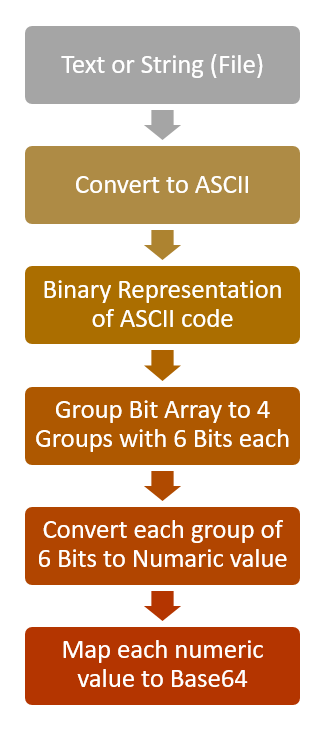
ASCII code represents data in 8 Bits. Base64 algorithm first groups Bits array of ASCII code into 4 groups of 6 bits each. Then each group of 6 bits is again mapped to Base64 code. The name “Base64” comes from the groups of 6 bits each. 2 to the power 6 is 64, hence the name Base64.
Illustration of the Base64 Encoding Algorithm
Text ‘SAP’ in Base64 is represented as ‘U0FQ’. Let’s look at how algorithm converts the text into the Base64 format.
Input text is,
‘SAP‘.
Text ‘SAP‘ in ASCII code is represented by,
‘83 65 80‘.
Binary representation of the ASCII code above is,
‘01010011 01000001 01010000‘.
Now group the complete bit array to groups of 6 bits.
010100|110100|000101|010000
Now convert each group of 6 bits to numeric.
20 | 52 |5 |16
Map each numeric value to Base64 character using the Encoding table below. 20 is ‘U’, 52 is ‘0’, etc. Full representation of 20 | 52 |5 |16 is,
U|0|F|Q

While Encoding happens from the top down as shown in the example above, Decoding happens from the bottom up. You can use this tool to Encode and this one to decode online.
Use Cases of Base64 in SAP Integration Scenarios.
Base64 is a great way to transfer XML, PDF, Text, and Image files among SAP applications, web services, and SAP APIs. When APIs don’t have the capabilities to transfer large files as attachments, use Base64 Encoded string to transfer data between systems.
In outbound scenarios, use this method to transfer Files generated in the SAP application server (AL11) between AIF (Application Integration Framework) and SAP Process Orchestration (PI/PO) using ABAP Proxies. You can find more information about AIF custom functions in this article. Convert the Files generated by SAP to Base64 and assign the Base64 value to the ABAP Proxy message. Implement a Java Mapping in PI/PO to decode the Base64 string back to text format. For example, Payment Data XMLs generated by SAP standard Payment Run (F110) can be transferred to PI/PO using an ABAP proxy in Base64 format.
For inbound scenarios, use the Base64 decoding method to process files imported to SAP via web services or PI/PO. You can directly process this data in SAP ABAP programs without saving them in AL11. Or, if the Files should be processed by SAP standard programs, save the file in AL11 and call the SAP standard program using ABAP keyword SUBMIT. For example, Electronic Bank Statements that are transferred from Banks through PI/PO can then be sent to SAP through ABAP proxy.
ABAP Function Modules to Encode Text to Base64.
Let’s encode String to Base64 format using ABAP Function Modules ‘SCMS_STRING_TO_XSTRING’ and ‘ SCMS_BASE64_ENCODE_STR’.
The first step is to convert the string (text) to XString. XSTRING is a predefined byte-like ABAP type with variable length which holds the value in Hexdecimal format. Usually Xstring type is used when we need to transfer heavy files such as XMLs, PDFs, etc. between SAP ABAP and Java applications.
Step 1: Use Functional Module SCMS_STRING_TO_XSTRING to Convert String to Xstring.
*Convert string to xstring

     CALL FUNCTION 'SCMS_STRING_TO_XSTRING'
      EXPORTING
        text   = p_input
      IMPORTING
        buffer = lv_xstring
      EXCEPTIONS
        failed = 1
        OTHERS = 2.
Step 2: Use FM ‘SCMS_BASE64_ENCODE_STR’ to Convert the Xstring to Base64.
*Convert XString to Base64

CALL FUNCTION 'SCMS_BASE64_ENCODE_STR'
        EXPORTING
          input  = lv_xstring
        IMPORTING
          output = lv_base64.
ABAP Function Modules to Decode Base64 to String.
Decoding of the Base64 format to String is done in three steps. First, we will convert the Base64 format to XString using ‘SCMS_BASE64_DECODE_STR’. Then, XString is converted to Binary using Function Module ‘SCMS_XSTRING_TO_BINARY’. Finally, Binary value is decoded to actual Text or String value using Function Module ‘SCMS_BINARY_TO_STRING’.
Step 1: Convert Base64 String XString Using Function Module ‘SCMS_BASE64_DECODE_STR’.
*Convert Base64 string to XString.

    CALL FUNCTION 'SCMS_BASE64_DECODE_STR'
      EXPORTING
        INPUT          = p_input
     IMPORTING
       OUTPUT         = lv_xstring
     EXCEPTIONS
       FAILED         = 1
       OTHERS         = 2.
Step 2: Convert Xstring to Binary ‘SCMS_XSTRING_TO_BINARY’.
Table’s parameter ‘binary_tab’ outputs the Xstring in Binary format.
*Convert Text to Binary

    CALL FUNCTION 'SCMS_XSTRING_TO_BINARY'
      EXPORTING
        buffer        = lv_xstring
      IMPORTING
        output_length = lv_len
      TABLES
        binary_tab    = lt_content[].
Step 3: Decode the Binary to Text (String) Format Using FM ‘SCMS_BINARY_TO_STRING’.
Exporting parameter ‘text_buffer’ of the Functional Module ‘SCMS_BINARY_TO_STRING’ outputs the decoded text value.
*Convert Binary to String

    CALL FUNCTION 'SCMS_BINARY_TO_STRING'
      EXPORTING
        input_length = lv_len
      IMPORTING
        text_buffer  = lv_string
      TABLES
        binary_tab   = lt_content[]
      EXCEPTIONS
        failed       = 1
        OTHERS       = 2.
ABAP Program Encode and Decode Base64 format.
The program has three selection screen parameters, one input parameter to enter either the Text that should be Encoded or the Base64 string which should be decoded with options to select either Encode or Decode.
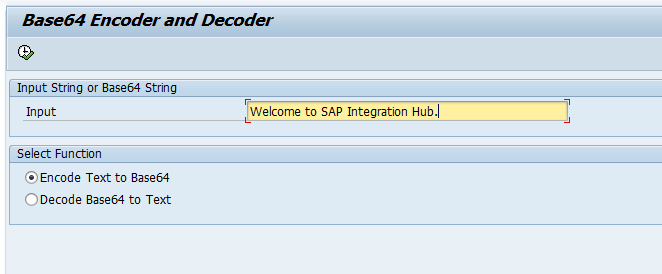
Select either Decode or Encode functions, depending on your input string.
Encoded or Decoded output is written into output screen.

ABAP Program Code for Base64 Conversion using FMs.
*&---------------------------------------------------------------------*
*& Report ZBASE64_ENCODE_DECODE
*&---------------------------------------------------------------------*
*&
*&---------------------------------------------------------------------*
REPORT ZBASE64_ENCODE_DECODE.

Data: lv_xstring  TYPE xstring,       "Xstring
      lv_len TYPE i,                  "Length
      lt_content  TYPE soli_tab,      "Content
      lv_string   TYPE string,        "Text
      lv_base64   TYPE string.        "Base64

SELECTION-SCREEN BEGIN OF BLOCK IN1 WITH FRAME TITLE TEXT-t01.
PARAMETERS: p_input type string OBLIGATORY LOWER CASE.
SELECTION-SCREEN END OF BLOCK IN1.

SELECTION-SCREEN BEGIN OF BLOCK IN2 WITH FRAME TITLE TEXT-t02.
PARAMETERS: p_encode RADIOBUTTON GROUP rb1 USER-COMMAND grb1 DEFAULT 'X',
            p_decode RADIOBUTTON GROUP rb1.
SELECTION-SCREEN END OF BLOCK IN2.

CASE 'X'.
  WHEN p_encode.

*Convert string to xstring

     CALL FUNCTION 'SCMS_STRING_TO_XSTRING'
      EXPORTING
        text   = p_input
      IMPORTING
        buffer = lv_xstring
      EXCEPTIONS
        failed = 1
        OTHERS = 2.

*Find the number of bites of xstring

      lv_len  = xstrlen( lv_xstring ).

      CALL FUNCTION 'SCMS_BASE64_ENCODE_STR'
        EXPORTING
          input  = lv_xstring
        IMPORTING
          output = lv_base64.

  WHEN p_decode.

*Convert Base64 string to XString.

    CALL FUNCTION 'SCMS_BASE64_DECODE_STR'
      EXPORTING
        INPUT          = p_input
     IMPORTING
       OUTPUT         = lv_xstring
     EXCEPTIONS
       FAILED         = 1
       OTHERS         = 2.

*Convert Text to Binary
    CALL FUNCTION 'SCMS_XSTRING_TO_BINARY'
      EXPORTING
        buffer        = lv_xstring
      IMPORTING
        output_length = lv_len
      TABLES
        binary_tab    = lt_content[].

*Convert Binary to String
    CALL FUNCTION 'SCMS_BINARY_TO_STRING'
      EXPORTING
        input_length = lv_len
      IMPORTING
        text_buffer  = lv_string
      TABLES
        binary_tab   = lt_content[]
      EXCEPTIONS
        failed       = 1
        OTHERS       = 2.
ENDCASE.

*Write the converted string to Screen.
CASE 'X'.
  WHEN p_decode.
    write lv_string.
  WHEN p_encode.
    write lv_base64.
  WHEN OTHERS.
ENDCASE.
Encode and Decode Base64 using ABAP Class CL_HTTP_UTILITY.
We can also use the HTTP utility class CL_HTTP_UTILITY. This utility class contains methods to directly encode or decode Base64 string.
Decode Base64 using method DECODE_BASE64.
Using static method DECODE_BASE64 decode Base64 string directly to string.
*Decode Base64 String to String
    CALL METHOD cl_http_utility=>if_http_utility~decode_base64
      EXPORTING
        encoded = p_input
      RECEIVING
        decoded = lv_string.
Encode Base64 using method ENCODE_BASE64.
Static method ENCODE_BASE64 allow us to encode string to Base64.
*Encode String to Base64
    CALL METHOD cl_http_utility=>if_http_utility~encode_base64
      EXPORTING
        unencoded = p_input
      RECEIVING
        encoded   = lv_base64.
ABAP Program to Encode and Decode Base64 using CL_HTTP_UTILITY Class.
I have re-designed the ABAP program to convert Base64 using CL_HTTP_UTILITY class methods ENCODE_BASE64 and DECODE_BASE64 .
*&---------------------------------------------------------------------*
*& Report ZBASE64_ENCODE_DECODE
*&---------------------------------------------------------------------*
*&
*&---------------------------------------------------------------------*
REPORT zbase64_encode_decode_v1.
DATA: lv_string  TYPE string,        "Text
      lv_base64  TYPE string.        "Base64
SELECTION-SCREEN BEGIN OF BLOCK in1 WITH FRAME TITLE TEXT-t01.
PARAMETERS: p_input TYPE string OBLIGATORY LOWER CASE.
SELECTION-SCREEN END OF BLOCK in1.
SELECTION-SCREEN BEGIN OF BLOCK in2 WITH FRAME TITLE TEXT-t02.
PARAMETERS: p_encode RADIOBUTTON GROUP rb1 USER-COMMAND grb1 DEFAULT 'X',
            p_decode RADIOBUTTON GROUP rb1.
SELECTION-SCREEN END OF BLOCK in2.
CASE 'X'.
  WHEN p_encode.
*Encode String to Base64
    CALL METHOD cl_http_utility=>if_http_utility~encode_base64
      EXPORTING
        unencoded = p_input
      RECEIVING
        encoded   = lv_base64.
  WHEN p_decode.
*Decode Base64 String to String
    CALL METHOD cl_http_utility=>if_http_utility~decode_base64
      EXPORTING
        encoded = p_input
      RECEIVING
        decoded = lv_string.
ENDCASE.
*Write the converted string to Screen.
CASE 'X'.
  WHEN p_decode.
    WRITE lv_string.
  WHEN p_encode.
    WRITE lv_base64.
  WHEN OTHERS.
ENDCASE.
Other Related ABAP Functions to Use with Base64 Function Modules.
In order to convert the File to Base64 format, first, you need to read the files from the application server (AL11). Read data from AL11 using OPEN DATASET,
READ DATASET, and CLOSE DATASET key words.
How to Encode Message to Base64 in SAP Integration Suite (CPI)
If you are interested in learning how to work with Base64 format using UDFs in SAP Integration Suite, you can go to the linked article.
I hope you learned how Base64 representation works, and the use cases of Base64. Encoding and Decoding of Base64 in SAP can be done using Function Modules or utility class CL_HTTP_UTILITY. If you have any questions on Base64 topics covered by the article, please leave a comment below.
The post Base64 Encoding and Decoding in SAP ABAP appeared first on SAP Integration Hub.