


There are certain integration scenarios where processing messages in sequence is crucial for business processes. That is, the order in which messages are processed is important. This technique is known as Exactly Once In Order (EOIO) or In-Order processing.
Can we achieve EOIO processing in SAP Integration Suite (BTP IS/CI/CPI)? As you may know, in SAP Process Orchestration (SAP PI/PO), this was possible.
For example, imagine a scenario where you are connected to a database system and need to insert or update data records, where the order of SQL statements is important. This could be for order processing, delivery tracking, or financial document posting. In such cases, it is critical to maintain the correct sequence of message processing.
Messages should be processed in the order they are received. If a particular message fails, any subsequent messages should not be processed until the failed message is successfully retried and completed.
In this article, we will explore:
How Exclusive JMS queues in SAP Integration Suite enable EOIO processing
A step-by-step implementation and configuration guide using the JMS Exclusive queue option
Understanding EOIO and Other Message Processing Methods
Let’s understand the difference between EOIO and other message-processing techniques when it comes to SAP or system integration.
Best Effort (BE) – Messages are processed as they arrive, with no guarantee of order.
Exactly Once (EO) – Ensures a message is processed only once, avoiding duplication but without enforcing order.
Exactly Once In Order (EOIO) – Ensures that messages are processed in the exact sequence they were received and that no subsequent message is processed until the previous one is completed.

Can an Exclusive JMS Queue in SAP Integration Suite Achieve EOIO?
As of now, SAP Integration Suite provides two types of JMS queue options: Exclusive and Non-Exclusive.
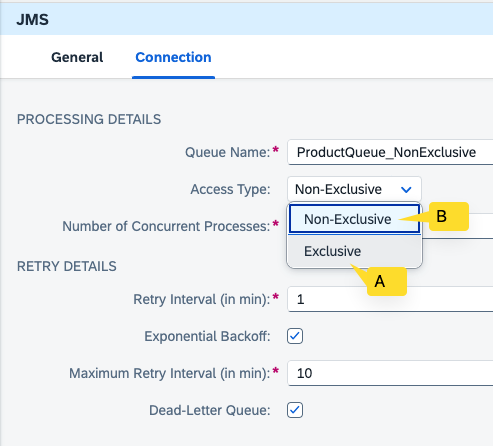
JMS queues of type Exclusive cannot be processed by multiple worker nodes or multiple consumers. Messages in an Exclusive JMS queue can only be processed by a single node, ensuring in-order processing. The JMS sender adapter picks up and processes messages sequentially, from the oldest to the newest, in the exact order they were received.
If a message in the JMS queue fails to process, the messages that come after it will not be processed until the failed message is successfully retried and completed. This makes the Exclusive JMS queue a viable option for scenarios where message order is crucial or where EOIO (Exactly Once In Order) processing is required.
While Non-Exclusive JMS queues allow messages to be processed by multiple nodes or consumers, they do not guarantee the order of processing.
Sample iFlow with Exclusive and Non-Exclusive Queues
To demonstrate the difference in behavior between Non-Exclusive and Exclusive queues, I created the following integration flows:
Message Producer iFlow
Flow 1 produces messages and places them in two queues: one in an Exclusive Queue (ProductQueueExclusive) and the other in a Non-Exclusive Queue (ProductQueue_NonExclusive).
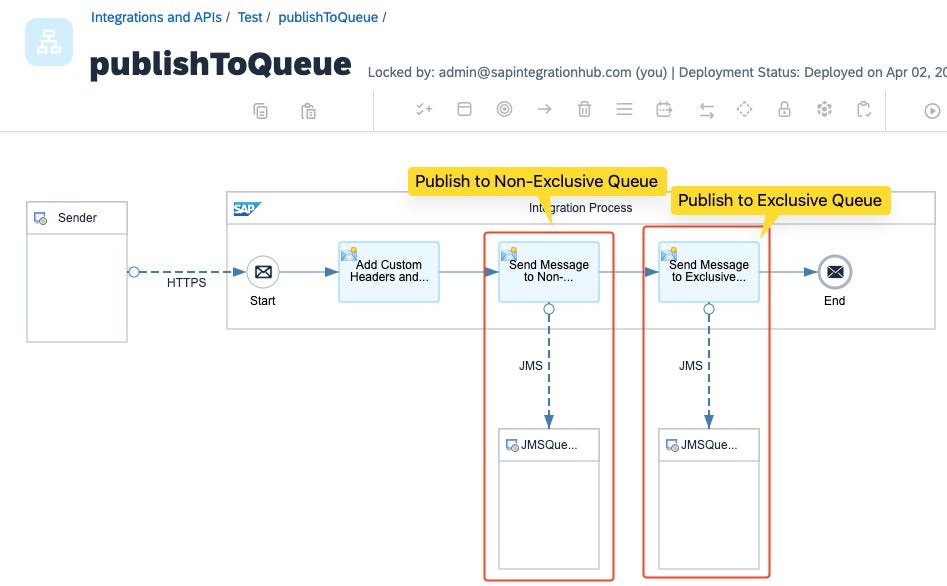
Message Consumer iFlow(s)
There are two JMS listeners (consumer iFlows): one retrieves messages from the Exclusive Queue, and the other retrieves messages from the Non-Exclusive Queue.
The processing logic for both consumer iFlows is the same; both attempt to update a table in the SAP HANA Cloud Database.
iFlow that Consumes Messages from JMS Exclusive Queue
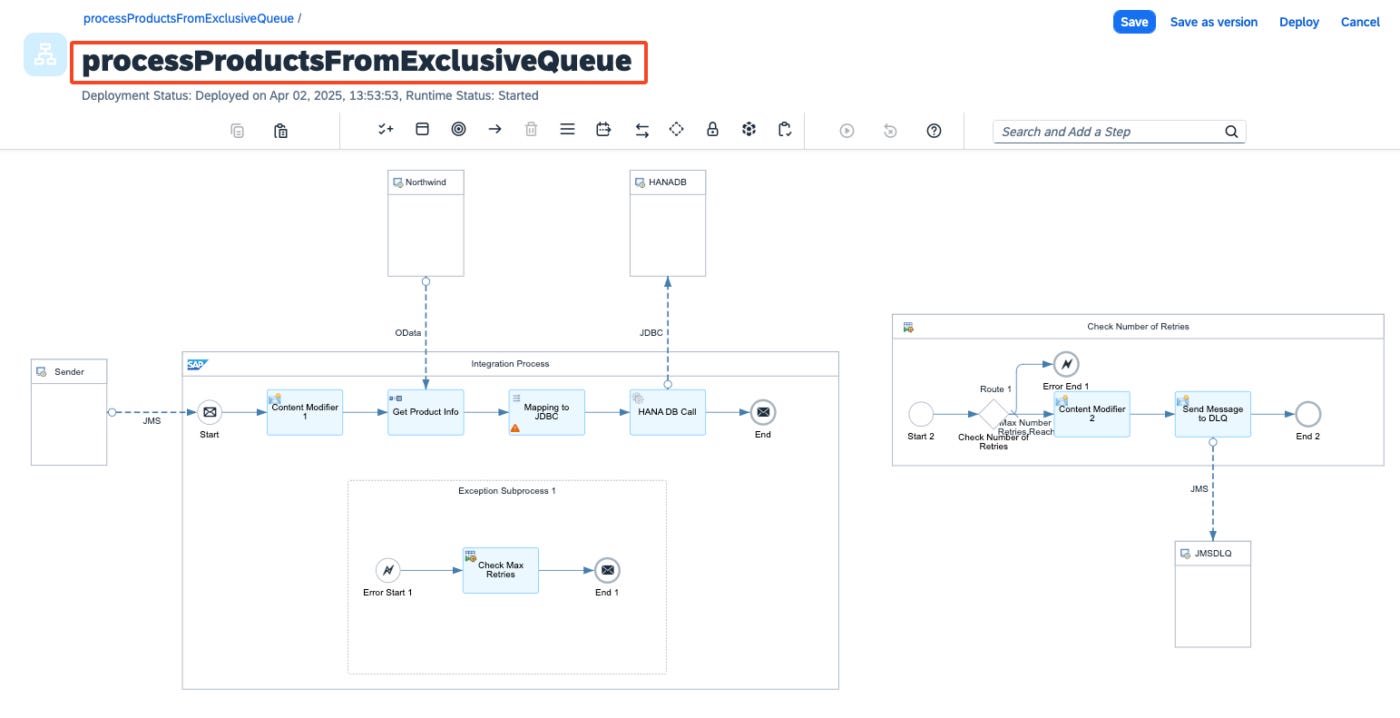
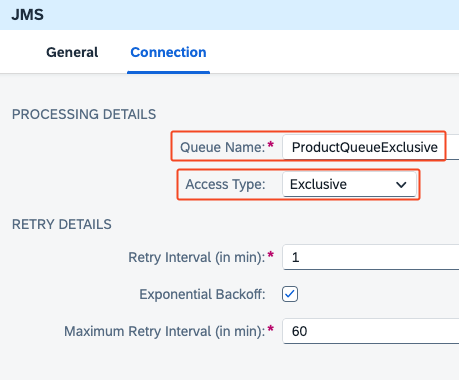
iFlow that Consumes Messages from JMS Non-Exclusive Queue
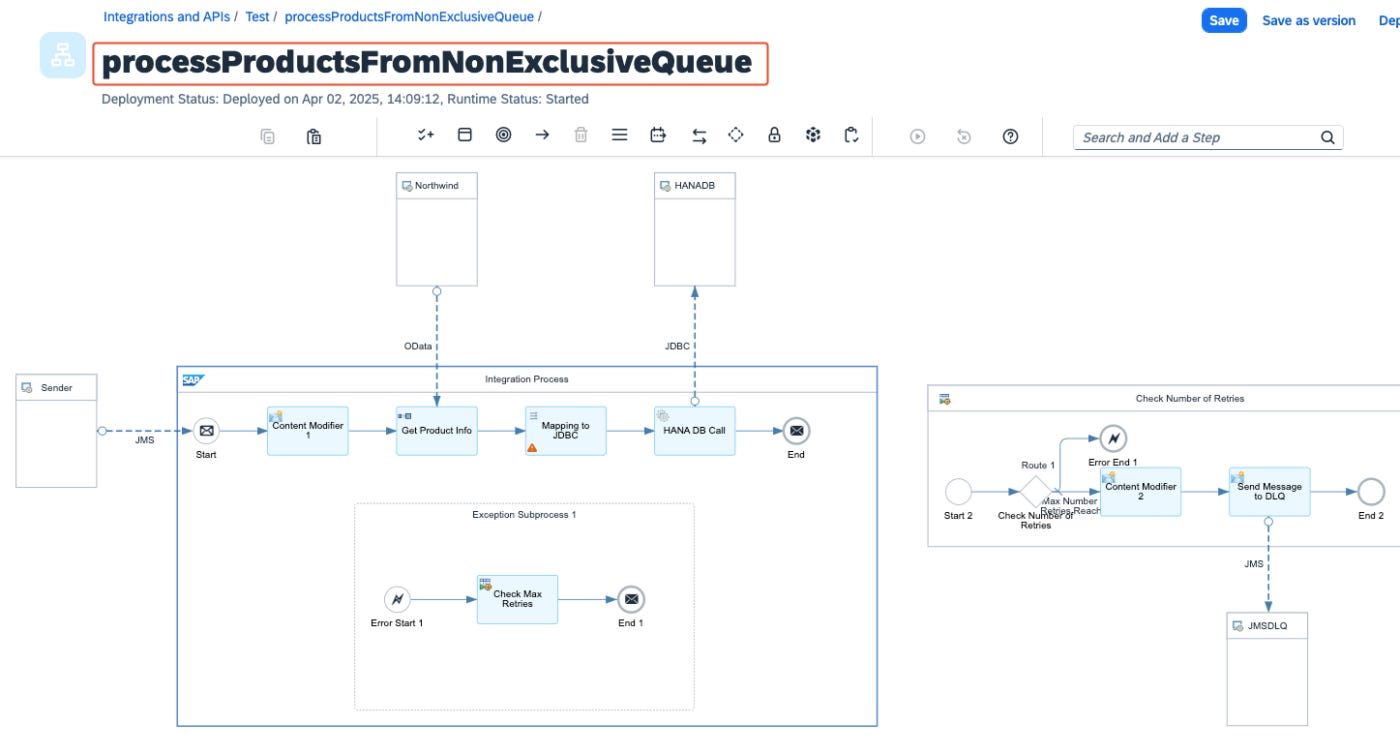
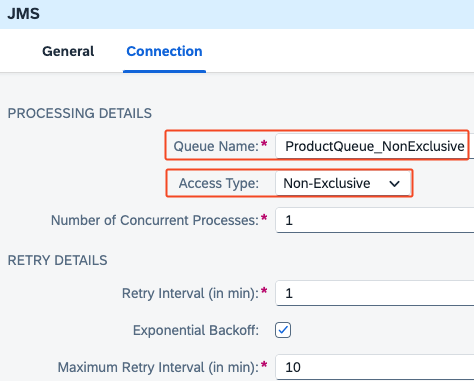
Testing the Behavior of Exclusive vs Non-Exclusive JMS Queue Consumption
I have pushed the same 3 messages to both JMS queues. They are now waiting to be picked up and processed by the respective iFlows.
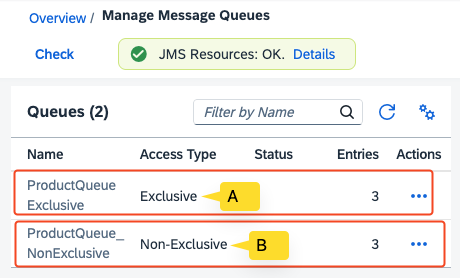
For demonstration purposes, I have made the SAP HANA Cloud Database unavailable so that JMS messages from both queues cannot be processed successfully by the receiver.


JMS Non-Exclusive Queue Consumer
In the Non-Exclusive queue, you will notice that the consumer picks up all the messages from the queue. In this example, all three messages are picked up and attempt to process them.
Hence, you see all messages in failed status as they cannot be moved to the target Cloud HANA DB, as the receiver system is offline.

JMS Exclusive Queue Consumer
However, in the Exclusive queue, only the first message that entered the queue is picked up for processing.
The remaining messages are not picked up because the first message has not been fully processed successfully. This behavior ensures EOIO (Exactly Once In Order) or FIFO (First In, First Out) sequencing.

Other Considerations when Working with JMS Exclusive Queues
Header Parameter SAPJMSRetries is Not Available for Exclusive Queues
💡 Tip
We usually use the JMS header parameter SAPJMSRetries to determine how many times a message has been attempted for processing by the JMS sender adapter. Based on this, we can build logic to set a maximum number of retries and send the message to a Dead Letter Queue (DLQ) if SAPJMSRetries exceeds the defined limit. This is typically done to prevent endless message processing.
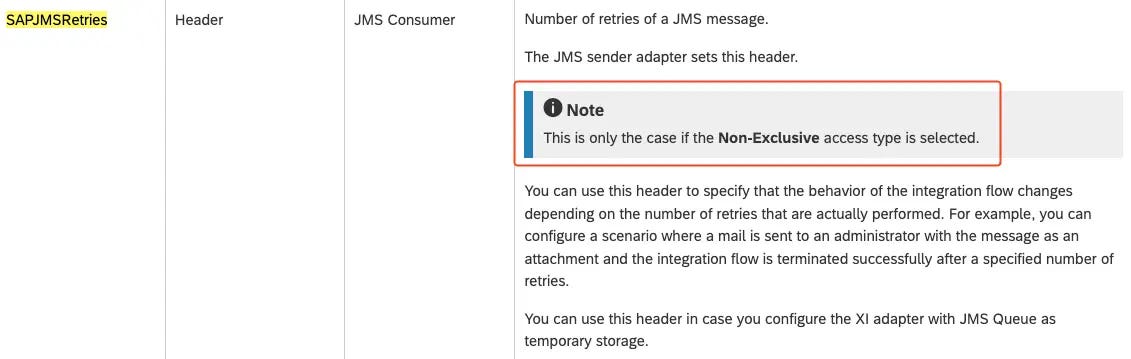
⚠️ Warning
However, the SAPJMSRetries header parameter is only available for Non-Exclusive queue consumers. If you are using an Exclusive queue, you cannot use the SAPJMSRetries header parameter.
What If the Adapter and Message Producer Do Not Support EOIO?
In my view, even if you use JMS Exclusive queues, EOIO in SAP Integration Suite cannot be guaranteed if the message producer does not ensure EOIO processing.
For example, if messages are produced by SAP S4 HANA and are being sent by the SOAP adapter, XI adapter, or HTTP adapter, and the sender-side adapter or SAP system does not guarantee that messages are received in the correct order to SAP Integration Suite, then we cannot ensure EOIO behavior for the end-to-end (E2E) scenario just by using a JMS queue.
Do Not Use Exclusive Queue for Everything.
⚠️ Warning
Notice that in exclusive JMS queues, if a message fails, all other messages that come afterward in the queue are not picked up for processing. One failure in a message can disable the processing of all subsequent messages.
That means a total failure of the entire message pipeline. Imagine you use an exclusive queue for delivery processing. Would you want to hold the processing of all deliveries just because one delivery fails to process?
So, think about the use case carefully before you implement exclusive queues.
Summary of EOIO Processing with JMS Queues in SAP Integration Suite
Unlike in SAP PI/PO, SAP Integration Suite did not initially have a standard mechanism for processing messages in EOIO (Exactly Once In Order) mode.
However, with the introduction of the “Access Type” feature in the JMS adapter, we now have the option to process messages in a FIFO sequence. By using an “Exclusive” JMS queue, messages can be picked and processed sequentially, from the first arrived to the last.
However, ensure that the message producer can guarantee EOIO; otherwise, maintaining the correct sequence may not be possible when you take the E2E integration.
📚 Learn SAP with me
Hope you enjoyed the article! If you’d like to learn SAP Integration with me, check out my Online Course on SAP Integration Suite.
The post EOIO Processing with JMS Exclusive Queues appeared first on SAP Integration Hub.