


Before we go through the steps on how to Publish Services in SAP PI/PO Service Registry, lets look at features of Service Registry.
Service registry is a UDDI based repository which contain enterprise services and related metadata. Located centrally in SOA landscape, It represents a set of web services. Service Registry supports SAP and non-SAP applications and developers can find availabe services they can use.
Main features of service registry,
Service providers can publish or expose their services centrally.
Consumers can search for available services by name or clarification.
You can assign user access to different services.
Integrated test environment.
Before posting the service under service registry, you should have the interface developed and ready. I would be using SOAP to RFC synchronous interface which I have explained in detail on a previous article. Follow the link to check the related post. This is the final step in exposing the web service to external parties. Publish the interface in service repository then send the third party the WSDL detail such as binding WSDL address, target address, physical WSDL file and username/password.
Note that only interfaces related to adapter types HTTP, SOAP, XI and WS can be registered in service registry.
There are two ways you can publish a interface in service registry.
Using Integration Directory menu.
Manually publishing the service.
Steps in detail for each method is as below:
Publish Service Using Integration Directory menu.
Open Integration Directory and navigate to your integration configuration.
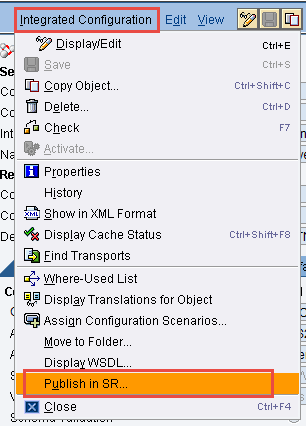
Use the main menu option: Integration Configuration>Publish in SR.
Publish Service Manually in Service Registry.
Navigate to your integration configuration in integration directory.
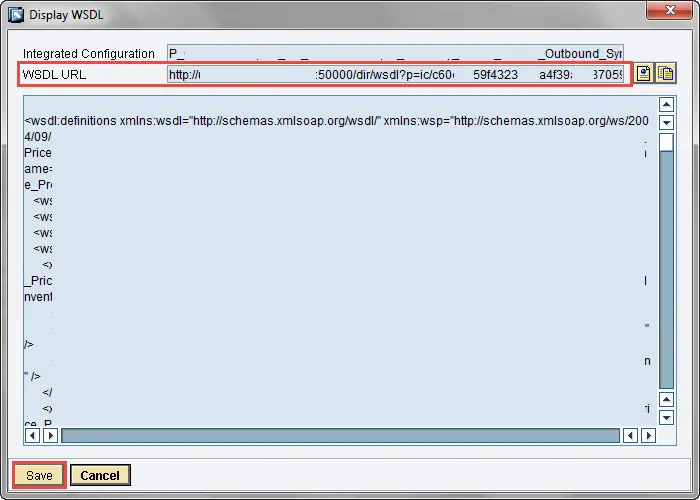
Go to main menu option: Integration Configuration>Display WSDL

Copy the binding WSDL URL and save the WSDL to local location.
Go to service registry under Netweaver start page.

Go to publish and input WSDL link copied from integration directory in the previous step.

Provide authentication.
Change service state, classifications etc as required.

To test the web service use any SOAP tools such as SOAP UI.
Import the previously downloaded WSDL to SOAP UI.
Provide username/password and import parameters.
The post How to Publish Services in SAP PI/PO Service Registry appeared first on SAP Integration Hub.