
If you are about to start learning API Management, it is tempting to jump straight into API proxies and policies. But API Management doesn’t live on its own, and understanding the ecosystem APIM lives in will help you understand its use cases better, especially when you start connecting APIM to Cloud Integration iFlows or to API providers such as on-premise S4 HANA systems.
First, we will place API Management inside SAP Integration Suite and SAP Business Technology Platform (BTP). Then we will walk through each capability of Integration Suite, one by one, so you know what each tool is for.
SAP BTP, SAP Integration Suite, and API Management
SAP API Management is one capability inside a larger product called SAP Integration Suite. SAP Integration Suite is SAP’s integration platform as a service (iPaaS), and it runs on SAP Business Technology Platform (BTP). So when someone says “APIM on BTP,” what they actually mean is the API Management capability of Integration Suite, running in a BTP subaccount.
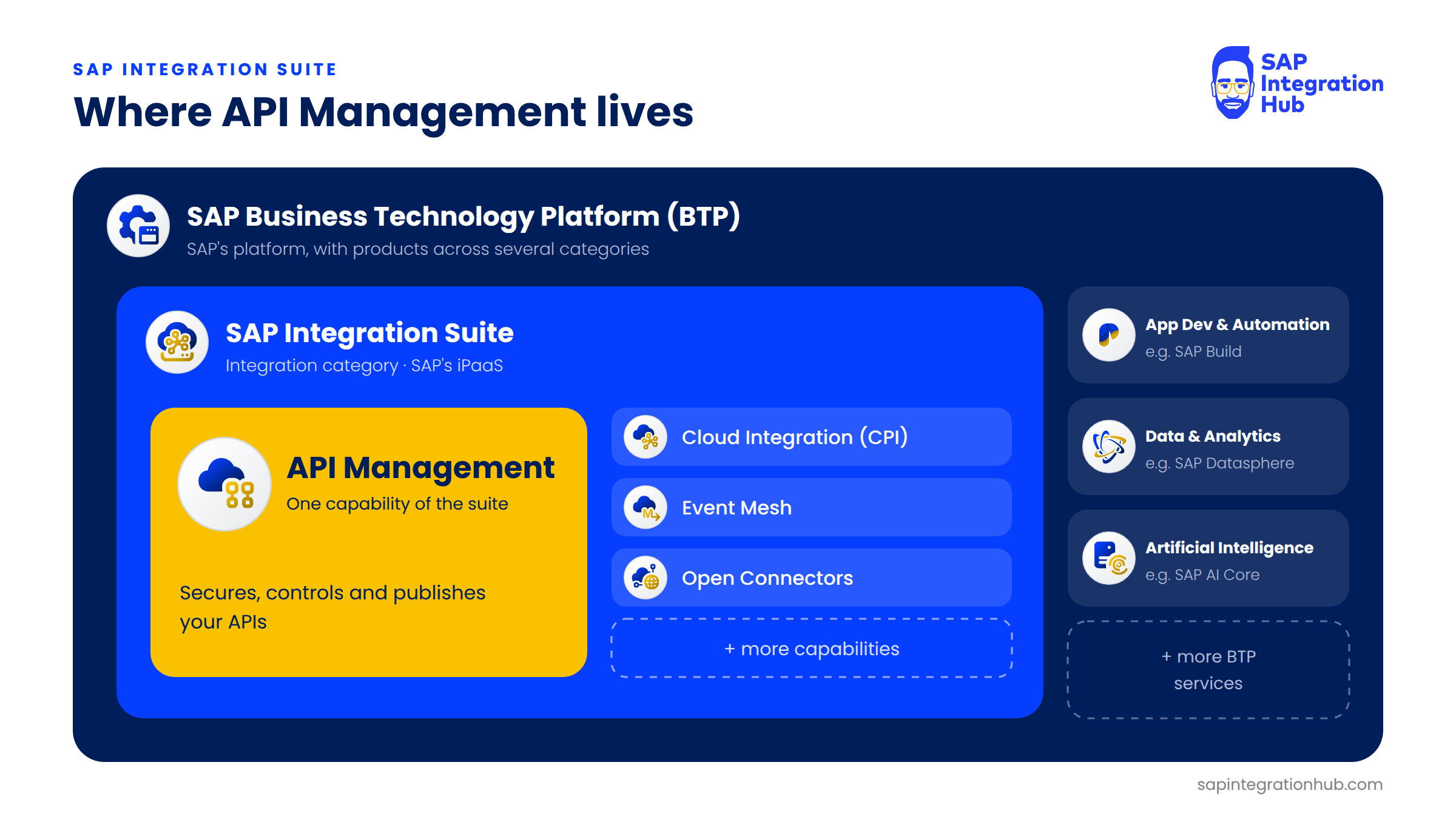
SAP API Management is one capability of SAP Integration Suite, which is SAP’s iPaaS running on SAP BTP.
I find it helpful to think of Integration Suite as a toolbox. Different integration problems call for different tools, and each tool in the box is what SAP calls a capability.
You activate only the capabilities you need in your Integration Suite tenant, so two companies running “Integration Suite” can be using very different parts of it.
The Capabilities of SAP Integration Suite
Let’s go through the toolbox. I have grouped these the way I think about them in practice: the core capabilities you will touch on in each and every project, and then the rest of the toolbox, which is more specialized.
Core Capabilities
1. Cloud Integration (CI) - Former Product CPI
Cloud Integration, which almost everyone still calls CPI, is the core engine of the suite and by far the most commonly used capability. This is where you build integration flows (iFlows) that move data between systems: mapping fields, transforming formats, and routing messages. If System A needs to send an invoice to System B and the formats don’t match, the iFlow that bridges them is built here.
If you are coming from SAP PI/PO, Cloud Integration is the closest thing to what you already know. This is one of the most widely used capabilities in SAP Integration Suite; I have always used SAP CI in every SAP S/4HANA implementation project where the integration platform was SAP Integration Suite.
2. API Management
API Management is the capability this entire series of articles is about. It sits as a governance and security layer in front of your APIs. It controls who can call an API, how often they can call it, and what happens to the request and response on the way through. It also gives API consumers a place to discover and subscribe to your APIs. We will go much deeper into each of these in the upcoming articles.
3. Event Mesh
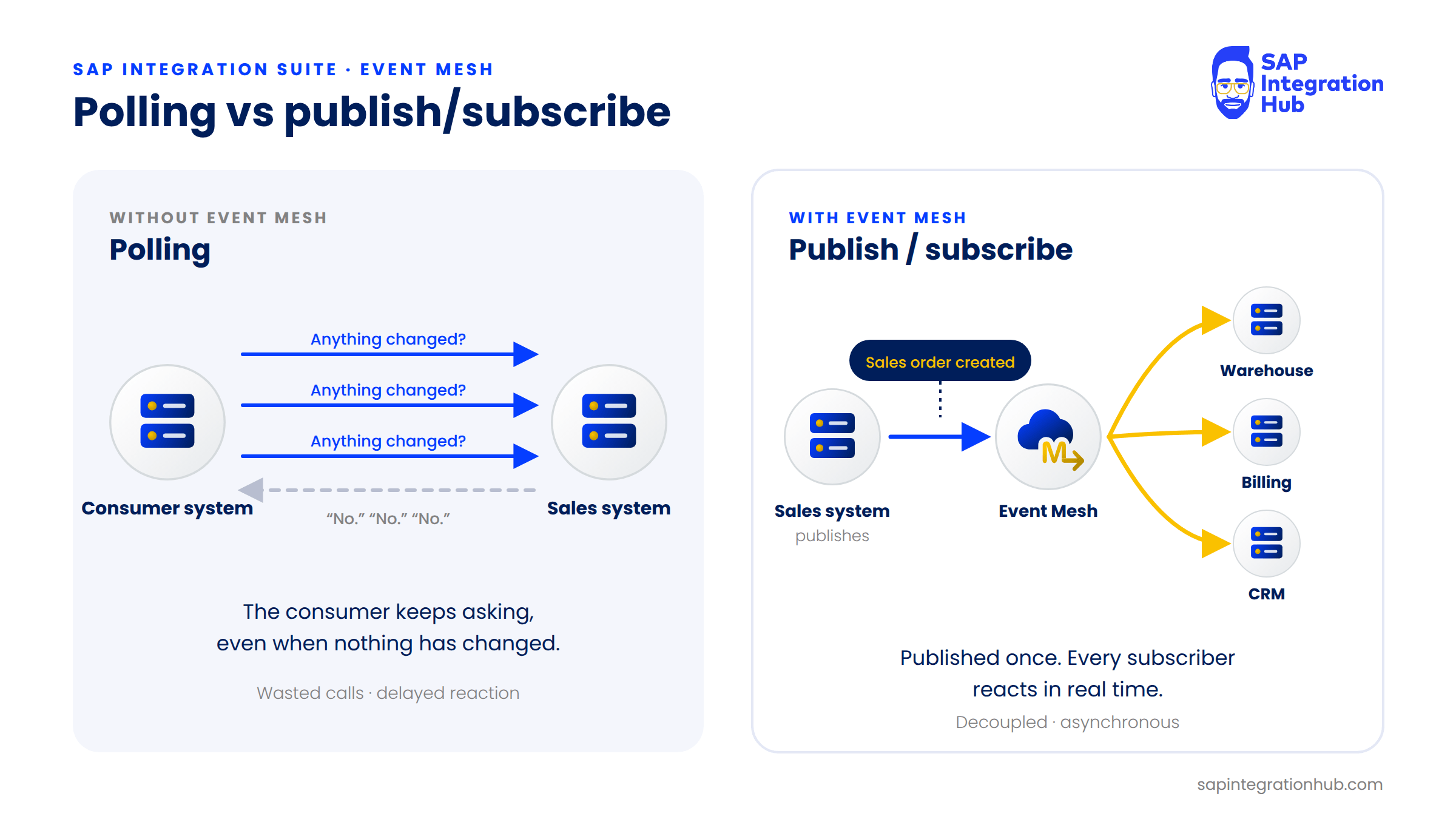
Event Mesh handles event-driven communication. A system that needs to know about a business event (business document change) typically polls another system over and over, asking “has anything changed yet?” Or the sender system having to push the data to each and every receiver system.
With Event Mesh, the source system publishes the business event instead, for example, “a sales order was created,” and any interested system subscribes to that event and reacts in real time.
The result is communication that is decoupled and asynchronous.
4. Open Connectors
Open Connectors gives you prebuilt connectors to third-party cloud applications such as Salesforce, Slack, and Dropbox. SAP currently lists more than 160 of them. The useful part is that they all sit behind one unified REST API, so instead of learning each vendor’s authentication model, pagination style, and error format, you connect to all of them in one consistent way.
The Rest of the Toolbox (Capabilities)
5. Trading Partner Management and 6. Integration Advisor
I like to think of these two as the B2B EDI integration tools. They are usually used together.
Trading Partner Management (TPM) handles Electronic Data Interchange (EDI) communication with your business partners: storing partner profiles, agreements, and the technical details of how you exchange documents with each one. Integration Advisor uses machine learning to help you build message implementation guidelines and mappings for B2B standards such as UN/EDIFACT and ASC X12.
However, my experience is that Integration Advisor helps to build mappings between EDI formats and iDocs for EDI integration with SAP S4 HANA. How you build mappings is a little bit different to the tradition message graphical message mapping. Hence, there is a bit of a learning curve to use it.
However, if your company exchanges orders, invoices, or delivery notes with external partners over EDI, these two capabilities can come in handy.
7. Integration Assessment
Integration Assessment is a planning tool. Before you build anything, it helps you evaluate your integration landscape and recommends which integration technology fits each scenario. It is a decision support tool for architects and integration consultants.
8. Migration Assessment
Migration Assessment is aimed specifically at organizations moving from SAP Process Orchestration (PI/PO) to Integration Suite. It analyzes your existing PI/PO interfaces and tells you which ones can migrate easily, which need manual work, and roughly how much effort to expect.
9. Graph
Graph is actually part of the API Management capability rather than a separate tool. It connects your SAP landscape into a single, unified API with a semantic data layer on top. So instead of a consuming application calling a dozen different endpoints across different SAP systems, it queries one endpoint and gets the business data it needs.
10. Edge Integration Cell
Edge Integration Cell is a hybrid deployment option. It lets you run the integration runtime inside your own private infrastructure, on a Kubernetes cluster you manage, while design, management, and monitoring still happen from the cloud. This matters for companies that have strict data residency or security requirements and cannot let certain messages leave their own network.
Alongside these ten, SAP’s own capability list also includes a few smaller ones, such as OData Provisioning and Data Space Integration. You won’t need them for this course, but it is good to know they exist when you browse the capability list in your tenant.
Which Capability Solves Which Problem?
Here is the rule of thumb I use when someone asks me, “which part of Integration Suite do I need?”
Move and transform data between two systems: Cloud Integration (CI)
Secure, throttle, and publish APIs for consumers: API Management
Notify many systems when something happens, in real time: Event Mesh
Connect to third-party SaaS apps in a simple way: Open Connectors
Exchange EDI documents with business partners: Trading Partner Management + Integration Advisor + CI
Decide which integration technology to use: Integration Assessment
Plan a move from SAP PI/PO: Migration Assessment
Expose many SAP systems through one business-data API: Graph (part of API Management)
Keep the runtime inside your own network (On-premise): Edge Integration Cell
In real projects, these capabilities are rarely used in isolation. A very common pattern, and one we will discuss in a future article, is an iFlow in Cloud Integration that does the heavy lifting, with API Management sitting in front of it to secure and control who can call it.
Where API Management Fits
So, to bring it together: SAP Integration Suite gives you all of these capabilities under one toolbox, and API Management is the one we focus on in this series of articles. It sits alongside Cloud Integration, Event Mesh, and the others as the governance and consumer-experience layer for your APIs.
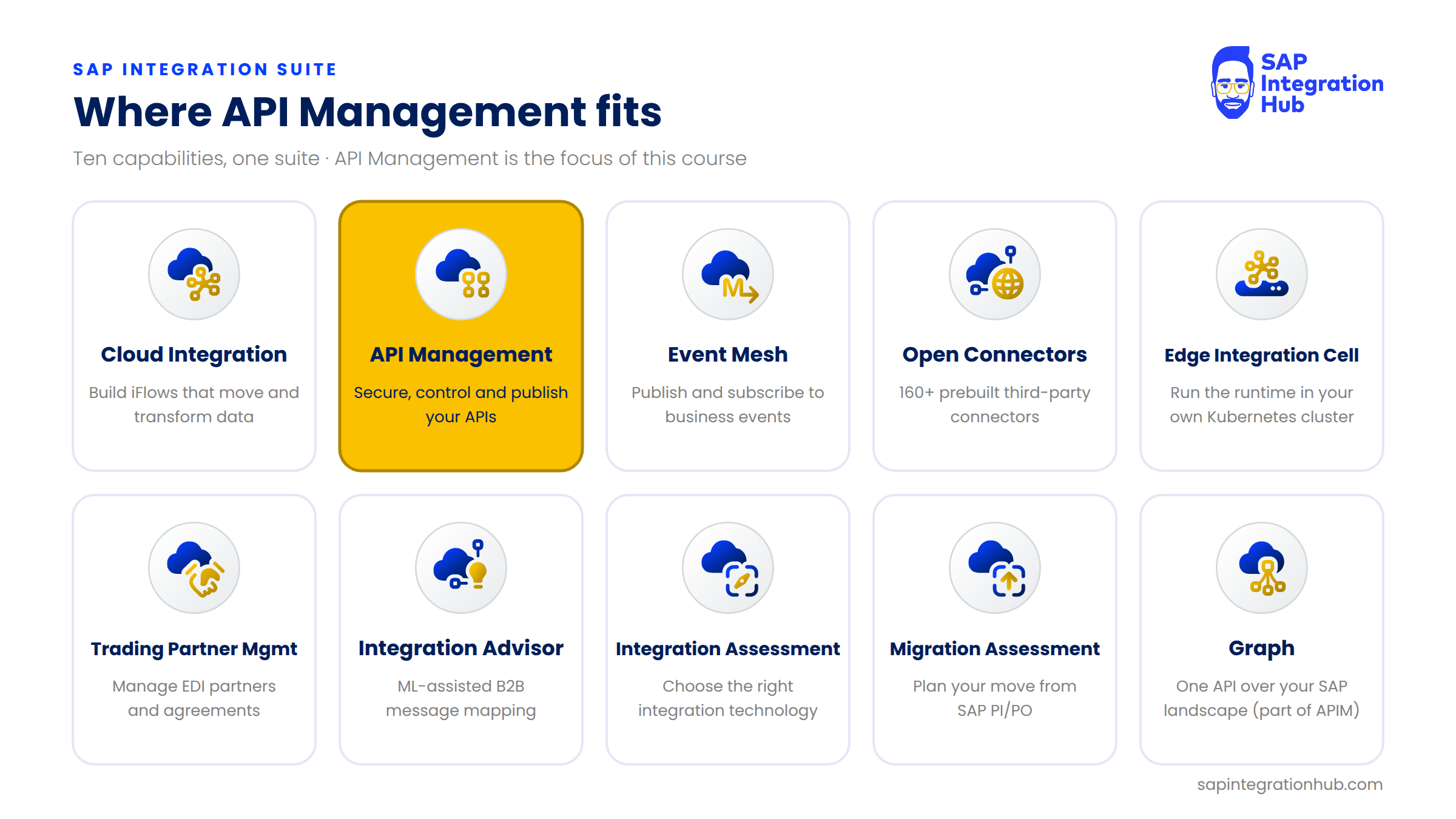
Cloud Integration answers the question “how do I connect these systems?”
API Management answers a different one: “now that this API exists, who is allowed to use it, how much, and how do they find it?”
In the next article, we will zoom in on API Management itself and look at what it actually does, the core functions it provides.
If you have any questions about the capabilities of SAP Integration Suite or where API Management fits, please leave a comment below. I will be happy to help.