


In this article, we will look at what an API is and how the request-reply model works. It may feel like a step back after the last few parts, but there is a good reason for it.
Every policy we configure later in the series, whether that is Spike Arrest, Quota, Verify API Key, or Assign Message, acts on either the request or the response. So this model is the foundation everything else in SAP API Management sits on.
First, we will define what an API is, using a simple example. Then we will walk through the request-reply flow step by step, take apart a real request and a real response, and finally see exactly where SAP API Management fits into that flow.
A Simple Scenario: The Weather App
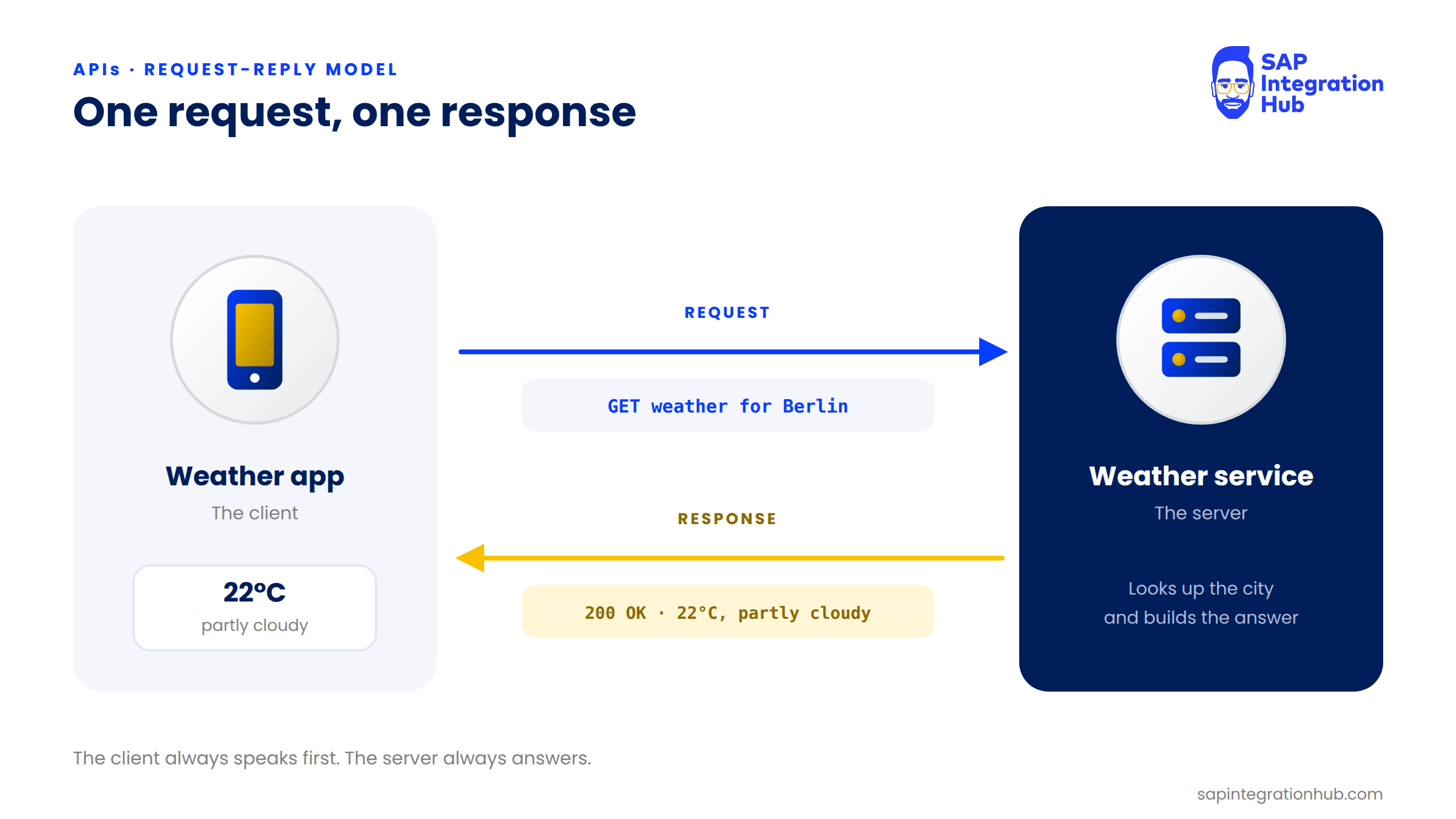
Let’s start with something familiar. The weather app on your phone doesn’t know the weather itself. It asks a weather service for it.
The app sends a request, the weather service looks up the data and sends back a response, and the app displays “22°C, partly cloudy.”
That round trip is what we are going to break down in this article.
What Is an API?
API stands for Application Programming Interface. It is nothing more than an agreed way for two applications to talk to each other.
It defines three things: what you are allowed to ask for, how you ask for it, and what shape the answer comes back in.
💡 Analogy
I find the easiest way to picture it is a waiter in a restaurant. You don’t walk into the kitchen and cook your own food. You tell the waiter what you want, the waiter takes the order to the kitchen, and the waiter brings the food back. You never need to know how the kitchen works. That waiter is the API.
In our example, the API is the contract between the app and the weather service: send a city name, get back the temperature and conditions. The app doesn’t need to know how the weather service calculates any of that. It only needs to know how to ask and what comes back.
This is also why API Management exists. When a company exposes APIs, for example an SAP system exposing business data, it needs to control who can call those APIs, how often they can call them, and what happens to the data going in and out.
The Request-Reply Model
The request-reply model describes how a client and a server communicate. The rule is simple: the client always speaks first, with a request, and the server always answers, with a reply.
💡 Two names
You will see “reply” and “response” used for the same thing. Request-reply and request-response describe the same model.
The Request-Reply Flow in Five Steps
Let’s walk through the full round trip, using the weather app as the client and the weather service as the server.
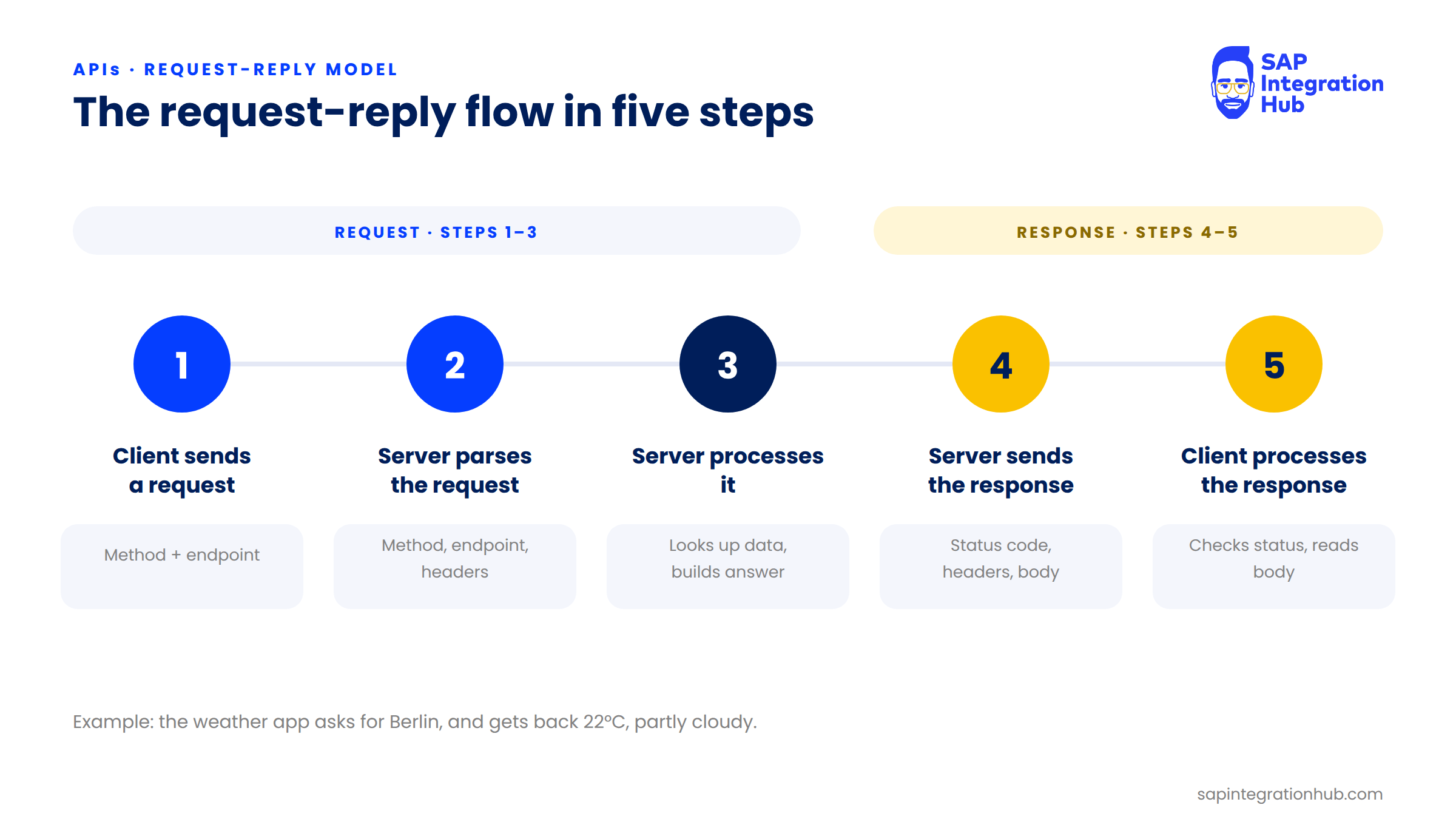
Step 1: The client sends a request. The app sends a request to an endpoint, the address of the API, using an HTTP method that tells the server what action to take. GET means “give me data.” POST means “here is some data, create or process something with it.” There are others, such as PUT and DELETE, which we will come back to when we work with API proxy flows.
Step 2: The server parses the request. It reads the method, the endpoint, and the headers. Headers are key-value pairs that carry extra information with the request, such as the response format the client expects, or an API key identifying who is calling.
Step 3: The server processes the request. The weather service looks up the city. It might query a database or call another service, and then it builds the answer.
Step 4: The server sends the response. A response is more than just data. It carries a status code that says whether the request succeeded or failed, plus its own headers.
Step 5: The client processes the response. The app checks the status code first, then reads the body of the response and displays “22°C, partly cloudy.”
Anatomy of a Request
Every request has three parts:
Request line: the HTTP method and the endpoint, for example GET and the weather API’s URL.
Headers: key-value pairs such as
Content-Type, or an authorization header that identifies the caller.Body (optional): the data you are sending. A GET request usually has no body, because you are only asking for data. A POST request usually has one, very often in JSON.
let’s take apart a real request to the weatherapi.com Current Weather API:
GET https://api.weatherapi.com/v1/current.json?key=YOUR_KEY&q=Berlin
HTTP method:
GET, because we are asking for data.Base URL:
https://api.weatherapi.com/v1, where the API lives. It is the same for every endpoint of this API.Path:
/current.json, the resource we want, which here is the current weather in JSON format.Query parameters: everything after the
?. Here,keycarries your API key andqcarries the location, such as Berlin or Colombo.
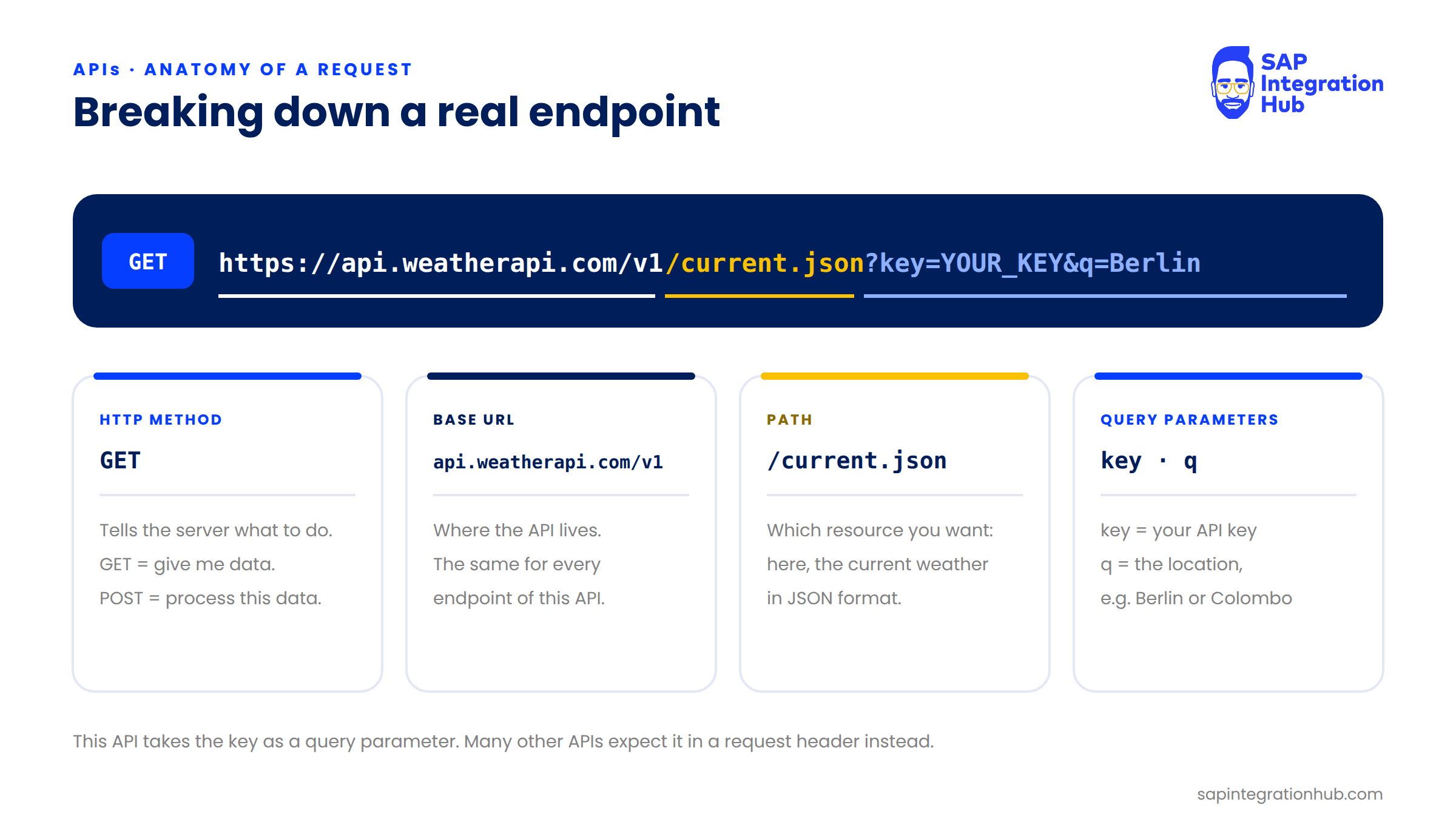
Notice that weatherapi.com expects the API key as a query parameter. Plenty of other APIs expect it in a request header instead, so always check the API’s documentation for where the key goes.
Anatomy of a Response
A response mirrors the shape of a request:
Status line: contains the status code.
Headers: the response’s own key-value pairs, such as the content type of the body.
Body: usually present, carrying the data you asked for.
The status code is the first thing a client checks, and its first digit tells you who is responsible for the outcome:
2xx, success: the request worked.
200 OKis the one you will see most.4xx, client error: the caller did something wrong.
401 Unauthorizedmeans missing or invalid credentials;404 Not Foundmeans the resource doesn’t exist.5xx, server error: the server failed while processing a valid request, for example
500 Internal Server Error.
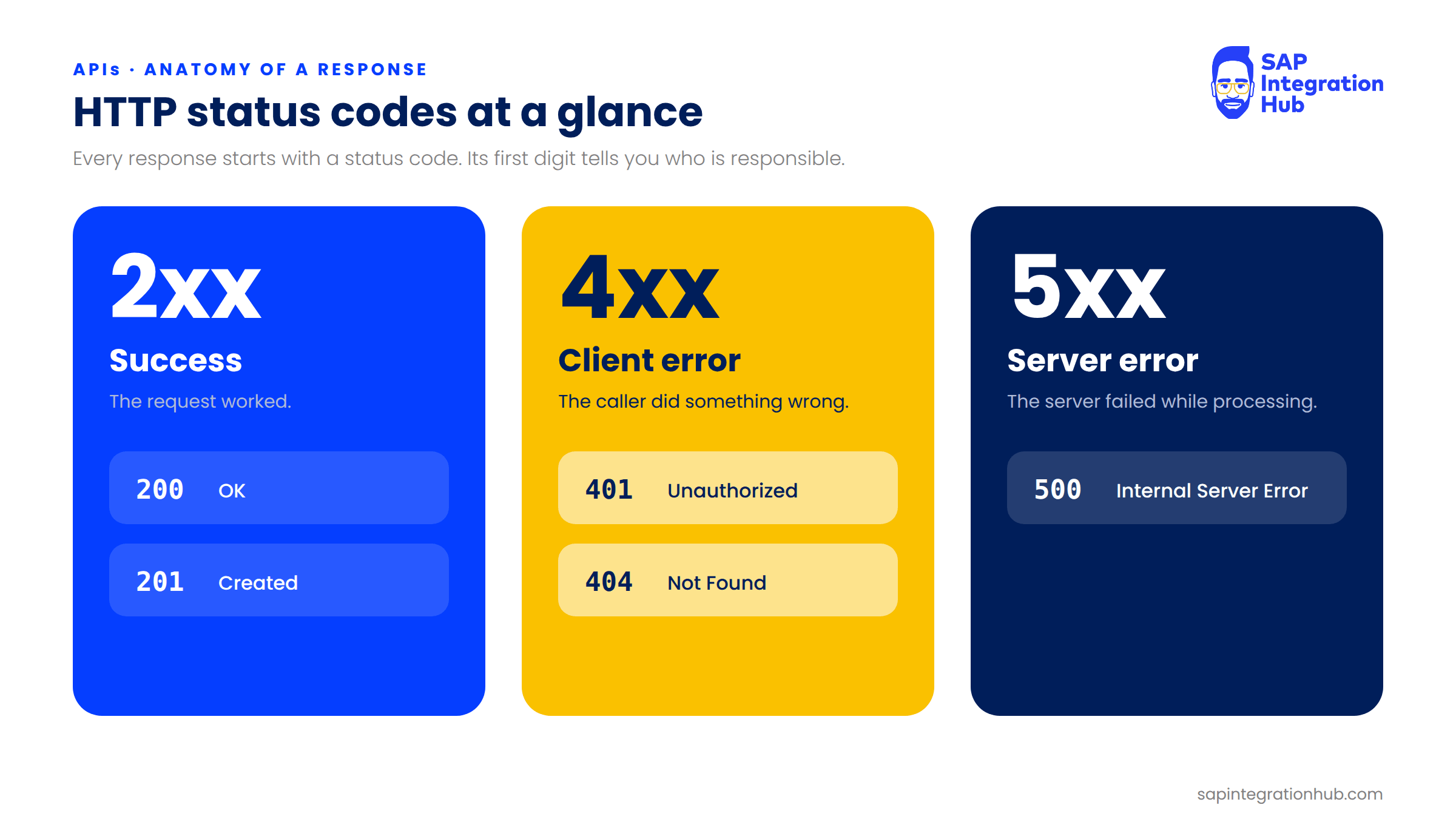
We will come back to these status codes when we look at error handling in SAP API Management, because a policy like Verify API Key or Quota answers with a 4xx code when it rejects a call.
Same API, Different Input, Different Output
Here is a small experiment that shows why this model is so useful. Request the weather for Berlin and you get back Berlin’s temperature. Now change one value and request Colombo instead.
Same endpoint, same method, same structure. Only the input changed, and the response is completely different. That is the whole point of an API: the same pattern every time, with different input producing different output.
Where SAP API Management Fits
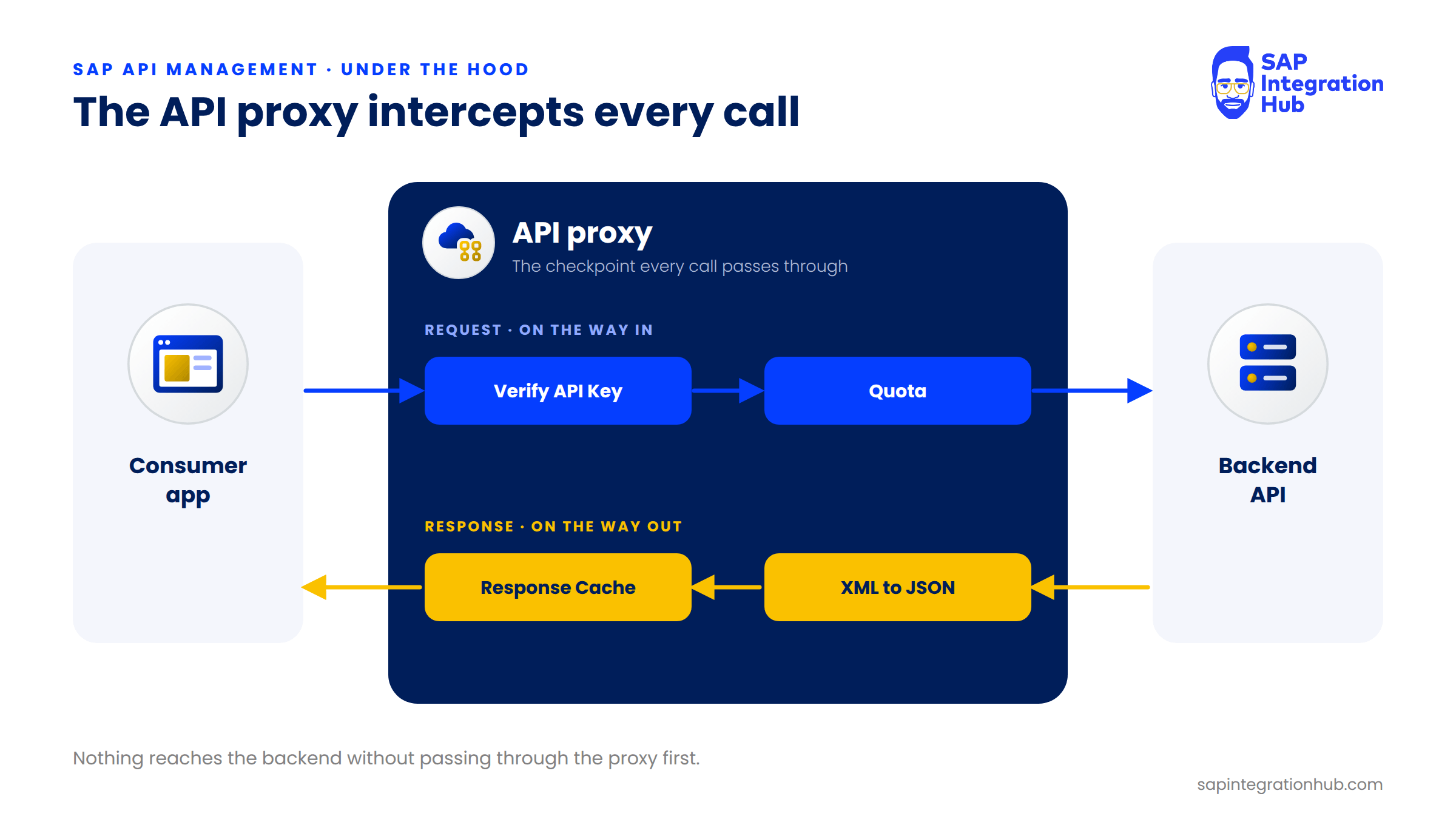
SAP API Management sits directly inside this flow. A request to an API managed by SAP APIM doesn’t go straight to the backend, whether that backend is S/4HANA or SAP Cloud Integration (CPI). It goes through an API proxy first.
The proxy inspects the request and applies policies, for example checking the API key or enforcing a quota, and then forwards it to the backend. The response passes back through the proxy on its way to the client.
💡 Key takeaway
Every policy in SAP API Management acts on either the request or the response. Once you understand the request-reply model, you understand where every policy runs.
Summary
An API is an agreed interface that lets two applications talk to each other, while hiding the complexity behind it. The request-reply model is the mechanism behind that conversation: the client sends a request with a method, headers, and optionally a body, and the server replies with a status code, headers, and usually a body.
In the next part, we will look at what an API proxy is and exactly where it sits in this flow. Subscribe so the next part lands straight in your inbox.
If you have any questions about APIs or the request-reply model, please leave a comment below. I will be happy to help.