


In this article, we will look at how SAP API Management (APIM) actually works under the hood. In the previous article, we went through the five core functions of API Management: Secure, Manage, Publish, Monitor, and Monetize. Now let’s look at the architecture that makes all of that possible.
First, we will look at the API proxy and the path every request and response takes through it. Then we will look at policies, the configurable building blocks that actually enforce the rules, and the four categories they come in. After that, we will see exactly where inside a proxy those policies are attached. Finally, we will look at the engine running all of this, which SAP didn’t build from scratch.
The API Proxy: A Checkpoint Between Consumer and Backend
The architecture is actually very straightforward. When a developer, or any application, calls your API, the request doesn’t go directly to your backend. It goes to an API proxy first, and the API proxy sits in the middle, between the consumer and your backend system.
So the flow looks like this: consumer app → API proxy → backend API.
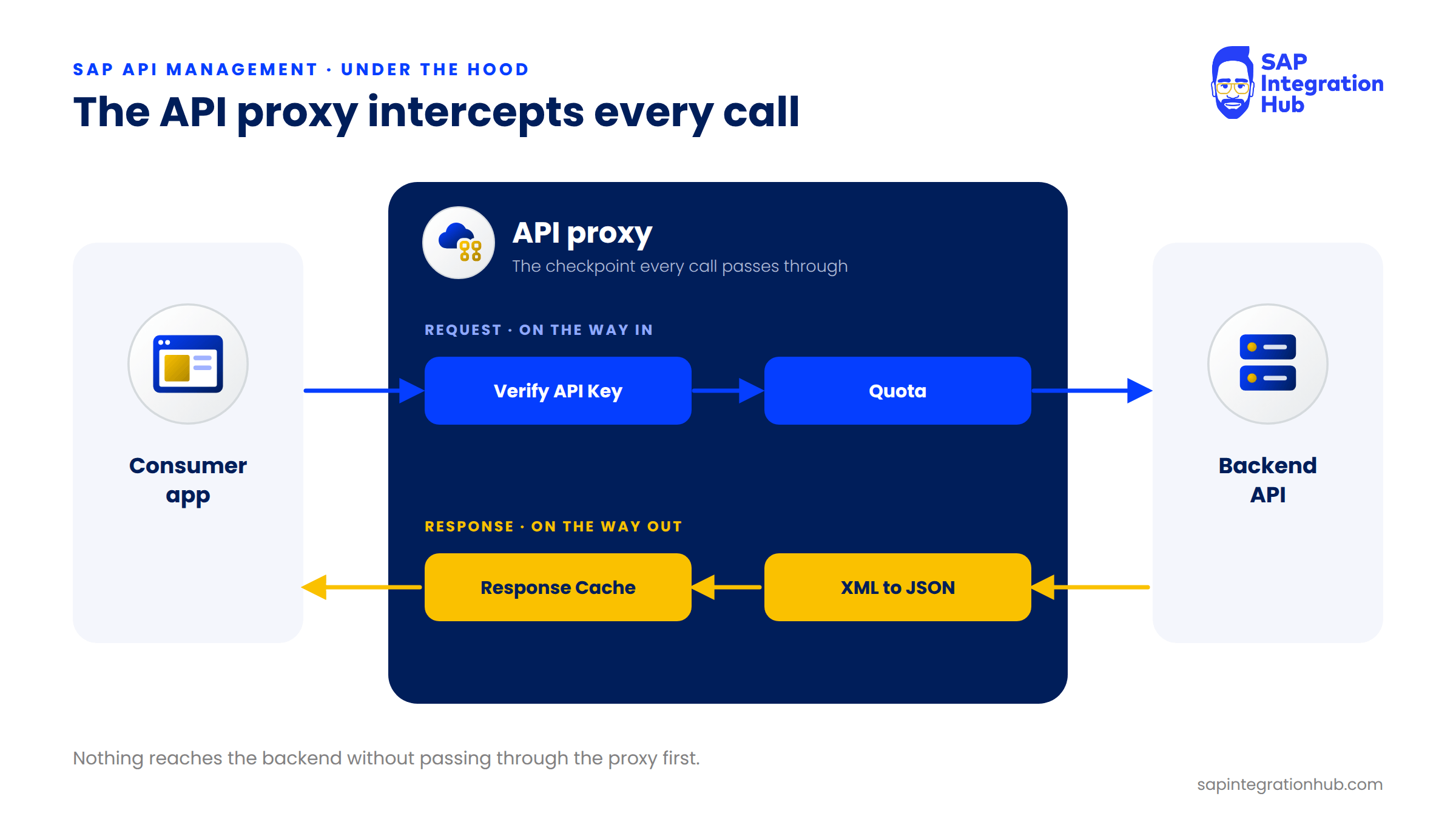
When a request comes in from the consumer, the API proxy intercepts it on the way in and applies your rules. It might check for a valid API key, or check whether the consumer has used up their quota. If everything looks good, it forwards the request to the backend.
When the backend sends back its response, the API proxy intercepts that too, on the way out. It can apply more rules at that point, for example converting the response from XML to JSON, or caching it for the next identical request. Only then does the final response go back to the consumer.
I find it easiest to think of the API proxy as a checkpoint. Every request passes through it on the way in, every response passes through it on the way out, and nothing reaches your backend without going through the proxy first.
Policies: The Building Blocks Inside the Proxy
Now, here is the important question. What are these “rules” the proxy applies? How do you tell it to check for an API key, limit traffic, or convert XML to JSON?
That is where policies come in. Policies are pre-built, configurable XML building blocks, and they are the core mechanism that makes API Management work. Instead of writing custom code for security or transformation, you attach a policy to your API proxy and configure it.
A few examples make this concrete:
To make sure every incoming request carries a valid API key, you add the Verify API Key policy and configure which header or query parameter holds the key. The policy does the rest.
To limit a consumer to 1,000 calls per day, you add a Quota policy and configure the limit and the time interval. The policy counts the calls and enforces the limit.
To convert an XML response from your backend into JSON before it reaches the consumer, you add an XML to JSON policy and configure the conversion options.
Example Policy Code Block - Verify API Key
<!--Specify in the APIKey element where to look for the variable containing the api key-->
<VerifyAPIKey async='true' continueOnError='false' enabled='true'
xmlns='http://www.sap.com/apimgmt'>
	<APIKey ref="request.header.apikey"></APIKey>
</VerifyAPIKey>
This policy block expects the request to come with a valid API key in the header parameter. The name of the header parameter should be apikey.
In SAP API Management, you don’t write code to secure, throttle, or transform an API. You configure policies and attach them to the API proxy.
Policy Editor Sample in SAP APIM
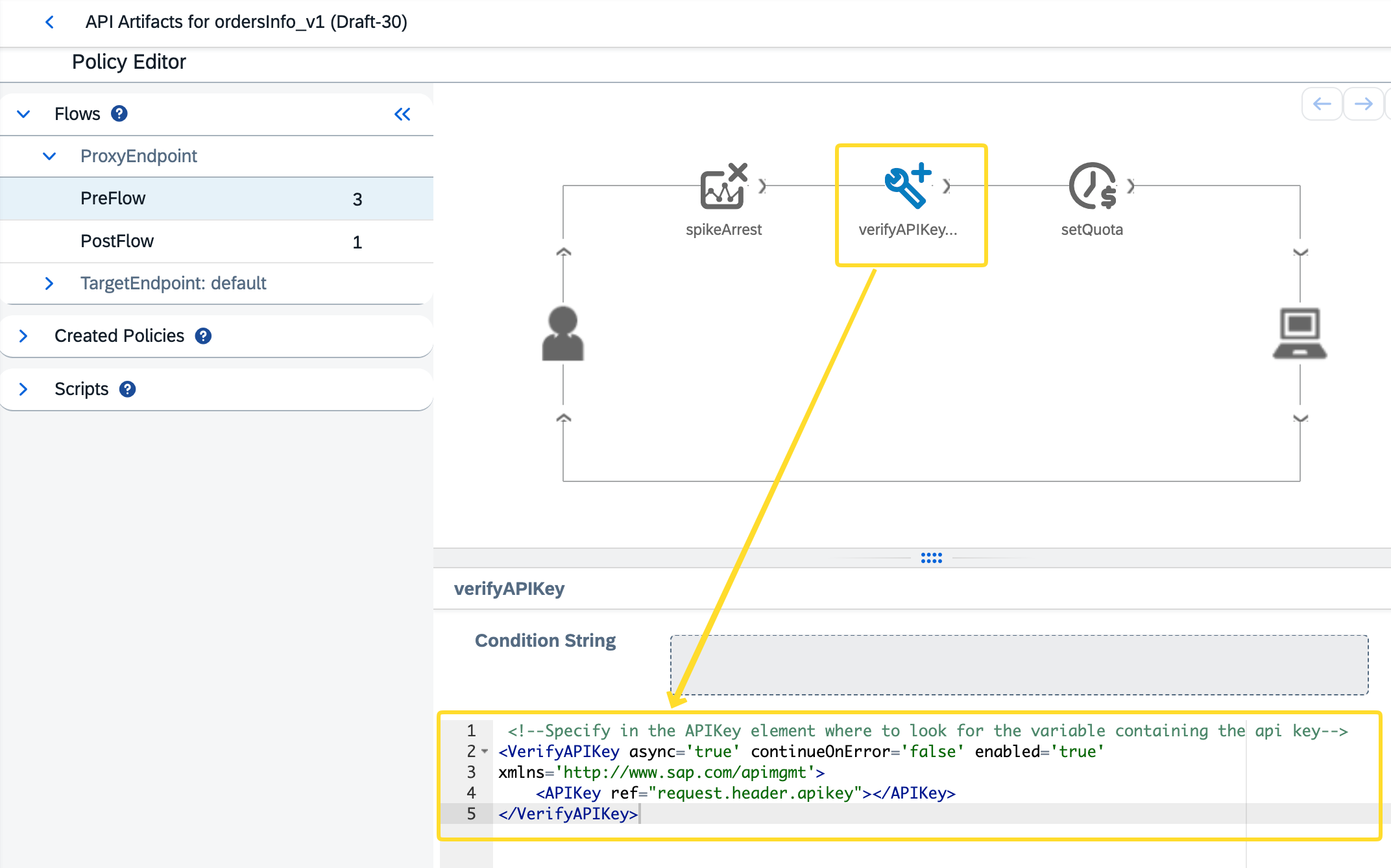
Notice there are three policies added to the request flow, including the Verify API Key policy with the policy code block configured.
The Four Policy Categories
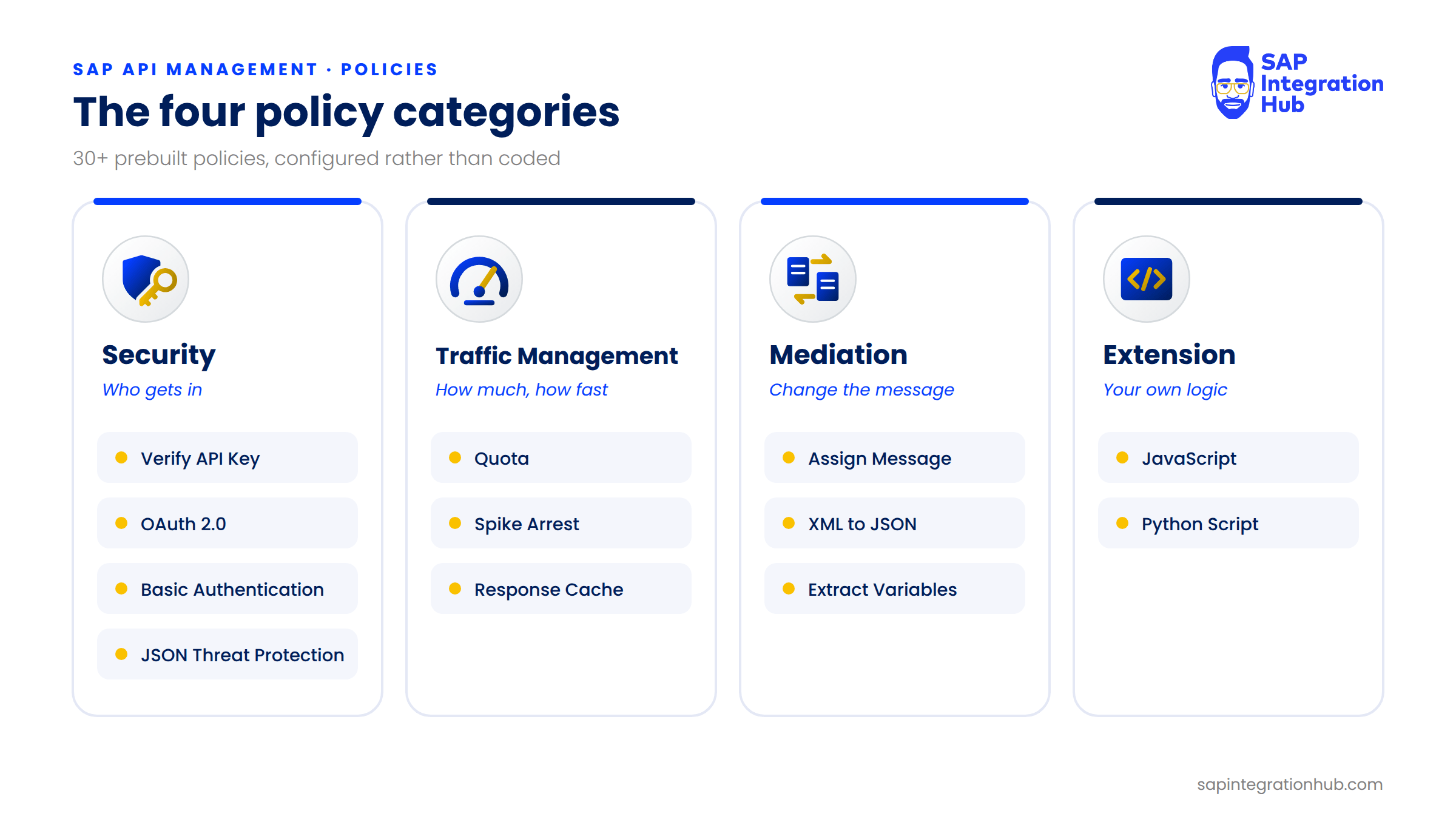
SAP provides more than 30 policy types out of the box, and the policy editor groups them into four main categories.
1. Security Policies
Security policies handle authentication, authorization, and protection against malicious requests and payloads. This is where you find Verify API Key, OAuth 2.0, Basic Authentication, and threat protection policies such as JSON Threat Protection.
In my experience, this is the category you will reach for most often.
2. Traffic Management Policies
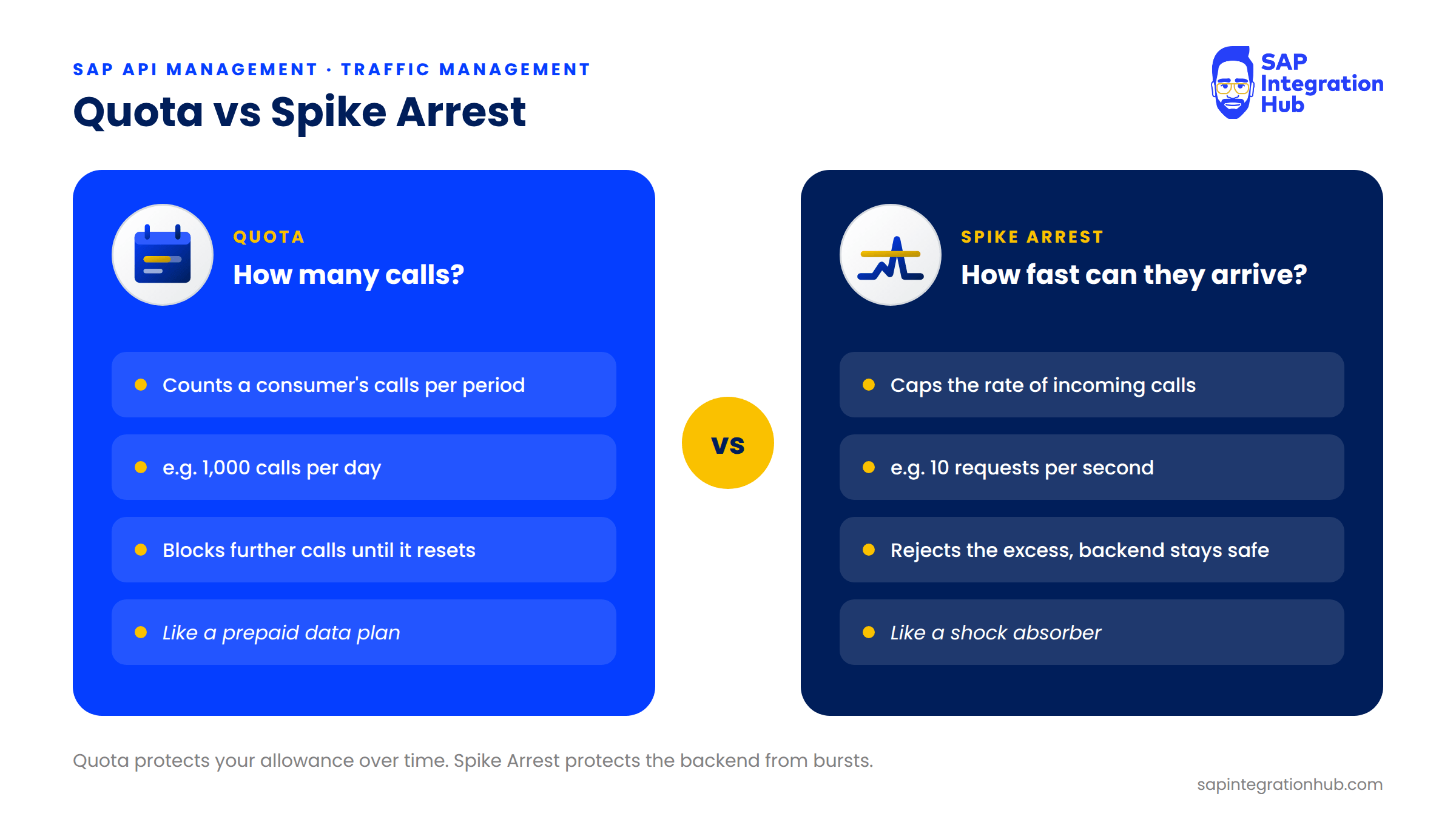
Traffic management policies control how much traffic flows through your API. The two you will meet first are Quota and Spike Arrest, and they are easy to confuse, so let’s take them one at a time.
Imagine you give a developer access to your API and tell them they can make up to 1,000 calls per day. That is a Quota. Once they reach 1,000, the API returns an error for every further call until the quota resets the next day. It works like a prepaid data plan on your phone: once your allocation is used up, you wait for it to reset.
Spike Arrest solves a different problem. Let’s say your backend comfortably handles 10 requests per second, and suddenly a consumer sends 500 requests in a single second, maybe because of a bug or a runaway retry loop in their code. Spike Arrest lets only the configured rate through and rejects the excess requests with an error, so the burst never reaches your backend. The consumer isn’t locked out for the day the way Quota does it; their calls simply succeed again as soon as the traffic drops back under the limit.
3. Mediation Policies
Mediation policies modify the request or the response as it flows through the proxy. Three you will use constantly:
Assign Message adds, changes, or removes headers, query parameters, and even the whole message body. For example, you can add an authentication header or a tracking ID before the request reaches the backend.
XML to JSON converts the backend’s XML response into JSON on the fly, so a mobile app that expects JSON gets it without anyone touching the backend service setup.
Extract Variables reads the payload, pulls out a specific value such as a customer ID, and stores it in a variable that other policies can use later in the flow.
4. Extension Policies
Sometimes the built-in policies don’t cover a very specific piece of logic. For those cases, extension policies let you write a short JavaScript or Python Script and attach it to the proxy like any other policy. The flexibility is there when you need it, but for most use cases the built-in policies are more than enough.
In this series of articles, we cover the most important policies from each of these categories, hands-on.
Where Policies Attach: Proxy Endpoint and Target Endpoint
So where exactly do these policies sit? Inside every API proxy, there are two main sections.
The ProxyEndpoint is the consumer-facing side. This is where the request comes in and the response goes out, so policies attached here deal with what happens between the consumer and the gateway.
The TargetEndpoint is the backend-facing side. This is where the gateway talks to your actual backend API, so policies attached here deal with what happens between the gateway and the backend.
Each endpoint has its own request flow and response flow. That gives you four points where you can attach a policy: the proxy request, the target request, the target response, and the proxy response.
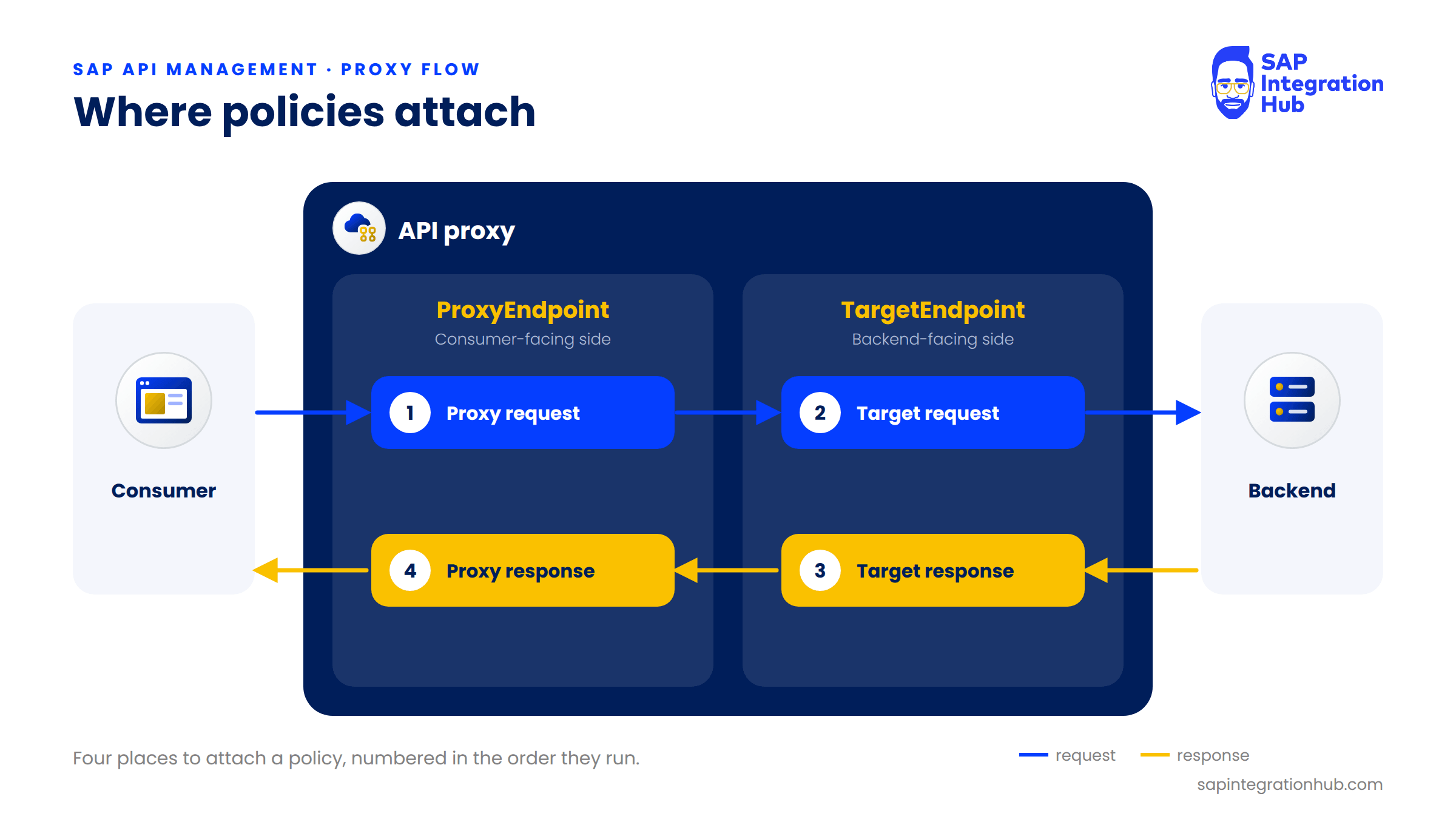
This is what gives you fine-grained control over exactly when each policy runs. We will go much deeper into this in the chapter on proxy flow and policies; for now, the thing to remember is that policies are the building blocks, and the proxy flow is where you place them.
The Engine Underneath: Google Apigee Edge
One more thing worth knowing: under the hood, SAP API Management is built on an OEM version of Google Apigee Edge.
In other words, SAP didn’t build the API gateway engine from scratch. It licensed the technology from Google, integrated it into SAP Integration Suite, and added its own tooling, monitoring, and developer experience on top. When you work with SAP API Management, the gateway processing your API calls is Apigee underneath.
That matters to you for two reasons. First, the platform is enterprise-grade and proven at scale, not a new and untested technology. Second, and this is the one I find most useful day to day, when you search for help online and land on Apigee documentation or community posts, a lot of that knowledge applies directly to SAP API Management. The policy names, the XML configuration syntax, and the flow variables are largely the same, so you have a much bigger knowledge base to draw from.
Summary
The key concept is the API proxy: it sits between the consumer and your backend and intercepts every request and every response. Inside the proxy, you attach policies, pre-built and configurable building blocks for security, traffic management, mediation, and extension. You don’t write code; you configure policies. And the engine running all of it is Google Apigee Edge.
In the next article, we will look at the five components of SAP API Management, the tools you will actually use to design, build, run, publish, and monitor your APIs.
If you have any questions about API proxies, policies, or how the proxy flow works, please leave a comment below. I will be happy to help.