


📚 SAP AIF Configuration Series - Guide #5
We are configuring default values on top of the iDoc interface we developed in our previous guides.
If you are new here and would like to see the previous articles, check out the following guides.
Default Value in SAP AIF Value Mapping
Introduction
In the previous chapter, we configured a multi-value mapping that determines a customer discount based on the ISO country code (E1SCU_CRE-E1BPSCUNEW-COUNTR_ISO) and customer type (E1SCU_CRE-E1BPSCUNEW-CUSTTYPE) of the incoming iDoc. That works perfectly as long as the incoming combination exists in the mapping table. But what happens when a customer arrives from a country that hasn’t been mapped yet?
By default, AIF will raise an error and the IDoc will not be processed. That’s the safe option, but it’s not always what the business wants. Sometimes you’d rather the customer gets created with a sensible fallback discount rather than failing completely.
This is exactly what a default value in SAP AIF is for. When a value mapping lookup fails to find a match, AIF can fall back to a predefined default value and continue processing the message successfully.

Scenario
We are building on top of the II_FL_CUST interface in namespace ZDEMO and the multi-value mapping VM_DISCOUNT from the previous chapter.
The new requirement is simple: if an incoming customer’s country and type combination is not found in the VM_DISCOUNT mapping table, AIF should not raise an error. Instead, it should assign a default discount of 2 to the E1SCU_CRE-E1BPSCUNEW-DISCOUNT field and continue creating the customer.
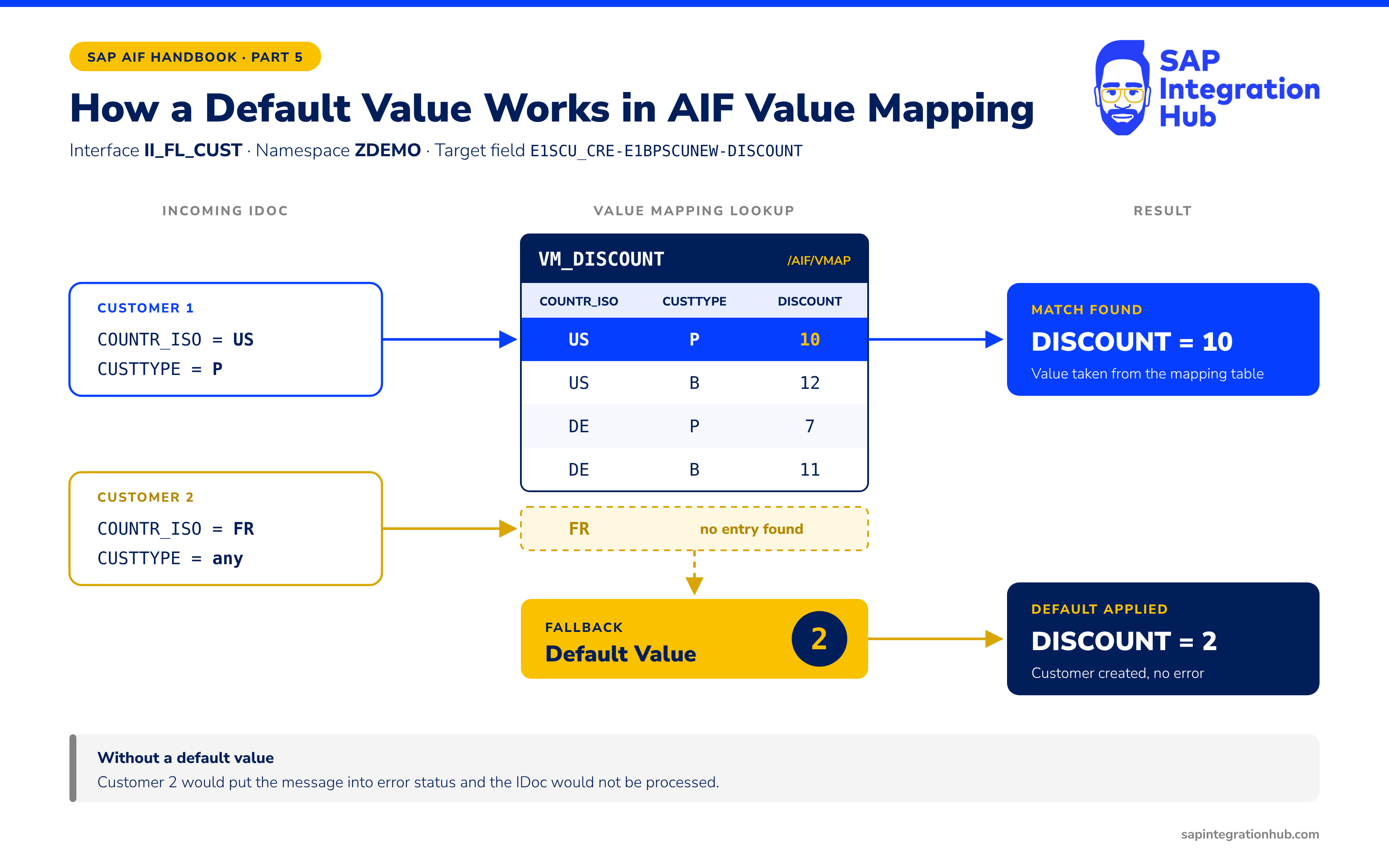
This gives us a safe fallback that keeps the interface running even when new country codes appear in the data that haven’t been mapped yet.
Prerequisite
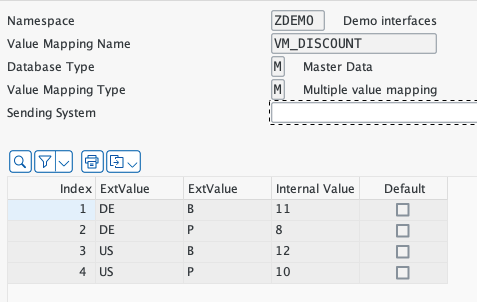
The multi-value mapping VM_DISCOUNT must already be configured as described in the previous chapter. The field mapping for E1SCU_CRE-E1BPSCUNEW-DISCOUNT referencing VM_DISCOUNT must be in place under Define Field Mappings for interface II_FL_CUST.
What Is a Default Value in AIF?
A default value in SAP AIF is a fallback that is applied to a destination field when the associated value mapping cannot find a matching entry for the incoming data. Instead of putting the message into error status, AIF uses the default value and marks the message as successful.
It is configured directly on the field mapping entry.
💡 Tip
Default values are particularly useful in interfaces where data quality from the source system is inconsistent. Rather than blocking every message with a missing mapping entry, you can apply a safe default and let the interface team clean up the mapping table without causing a backlog of errors.
Step 1 - Add the Default Value to the Field Mapping
Transaction: /AIF/CUST → SAP Application Interface Framework → Interface Development → Define Value Mappings
Navigate to Define Field Mappings for interface II_FL_CUST, namespace ZDEMO, version 1. Find the existing field mapping entry for the destination field E1SCU_CRE-E1BPSCUNEW-DISCOUNT - this is the entry we created in the previous chapter that references value mapping VM_DISCOUNT.
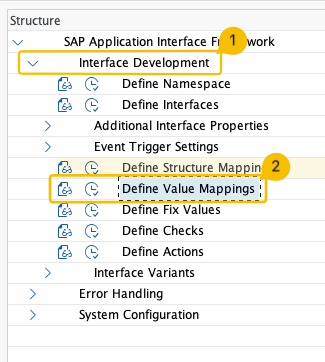
Alternatively, you can go to Interface Development → Define Value Mapping to access the value mapping directly.
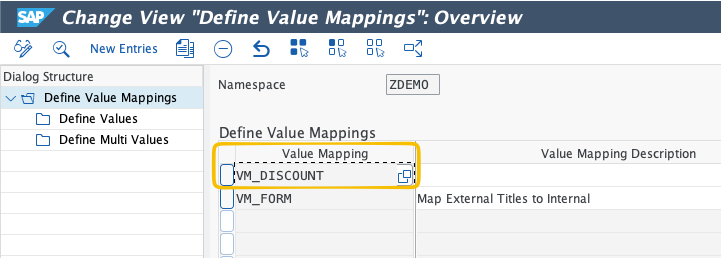
Select the value mapping VM_DISCOUNT. Open the entry and set the Default Value field to 2.
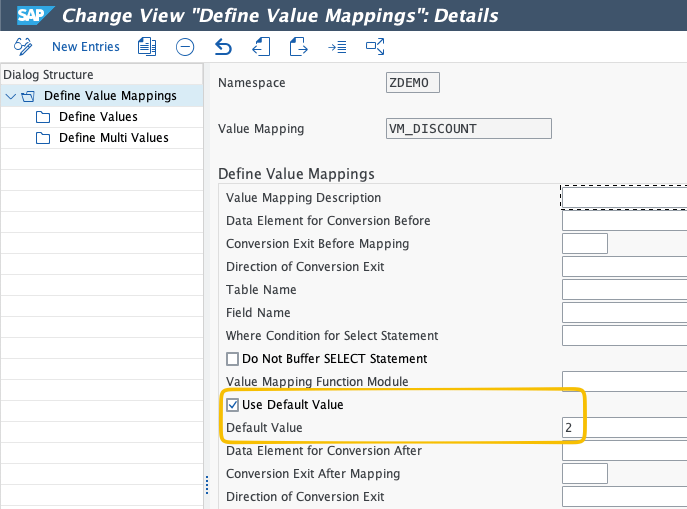
Save your changes.
💡 Tip
The default value must be a valid internal value for the destination field; the same type and format as the values in the Internal Value column of your mapping table. For the DISCOUNT field, this is a numeric value, so entering 2 tells AIF to assign a discount of 2 whenever no matching mapping entry is found.
Step 2 - Test the Interface
Let’s create a customer from the country of France (FR). In our value mapping table, we do not have any entries maintained for country FR.
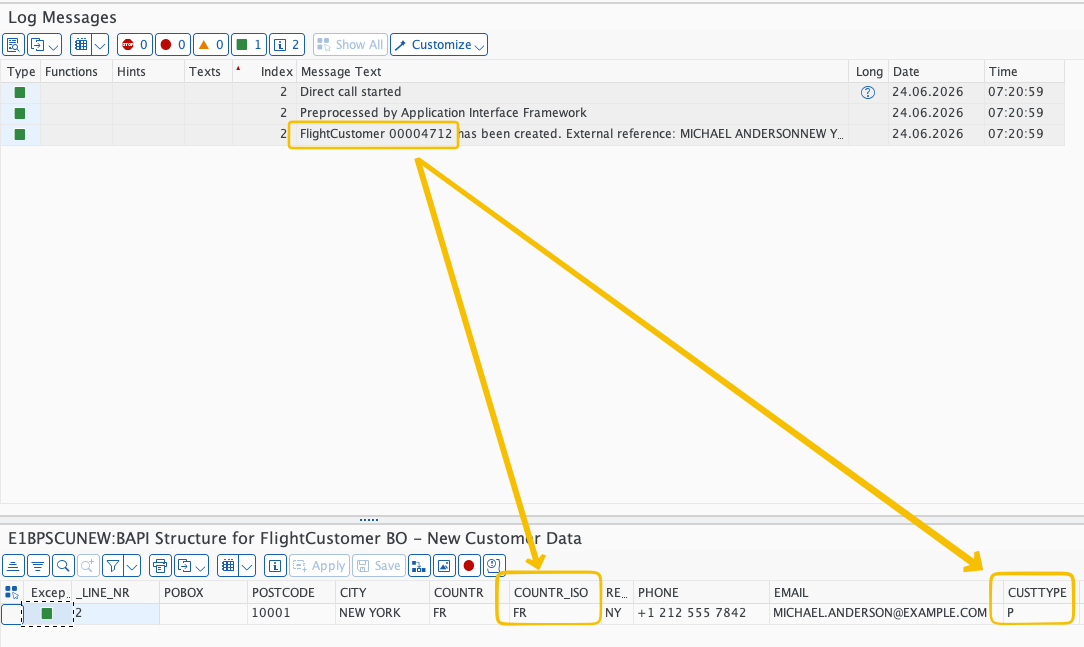
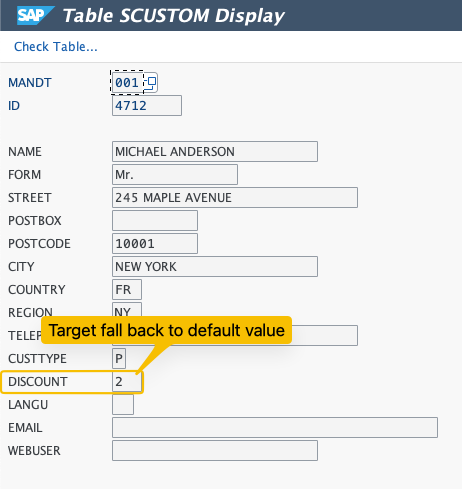
Step 3 - Verify the Customer Master Record
Notice that the default discount value of 2 is applied to the customer created.
📚 Want the complete AIF eBook?
We have put everything we know about SAP AIF into a single eBook: the SAP AIF Configuration Guide. It is the complete collection with more than 75 articles like this one.
It covers how to set up AIF in your SAP system for the first time, the use cases we see most often, full configuration walkthroughs, and the lessons we have learned from past SAP S/4HANA implementation projects.